Every AI Vendor Claims "Agent." Here's What That Actually Means for Engineering Teams September 2026
10 min read
Five questions cut through AI agent vendor demos and show engineering teams whether a tool executes in their stack or just talks. Sep 2026.

AI agent is the most overloaded term in engineering software right now. A tool that narrates steps for you to run and a tool that executes inside your tools and hands the result back both get the same label. Before your team signs off on anything, there are five questions worth asking in the demo that cut straight through the positioning.
The Problem: "Agent" Means Everything and Nothing
You are watching a live demo. The vendor's AI takes a complex geometry, runs through an engineering workflow, and the result looks clean. You ask whether it runs inside your software tools or whether you need to export your model first. The answer comes back something like, "it integrates with your workflow." You ask again. More rephrasing.
That's the tell.
"Agent" has become the word vendors reach for when they want to sound capable without committing to specifics. The label covers everything from a chat window that generates a Python snippet to software that actually opens SolidWorks, edits the feature tree, and hands the result back inside the same file. Both call themselves agents, and neither definition is technically wrong, which is what makes procurement so difficult right now.
Engineering organizations are signing multi-year contracts based on demos that were never stress-tested against their actual toolchain. Without a shared vocabulary for what these products do, it's easy to buy something that works in a slide and frustrates your team six weeks after rollout.
This piece gives you a working framework to separate genuine agent behavior from a well-produced demo.
TLDR:
A real agent executes inside your tools and hands the result back in the same file. A text interface does not.
If a vendor hedges on whether the AI executes natively or resets between sessions, that is the answer.
Ask about five things in any demo: tool calling, context window, memory, guardrails, and data retention.
Require the vendor to show a live review gate where the agent pauses and hands the call back to you.
Cosmon's AI Agent runs natively inside your engineering software tools - SOLIDWORKS, Ansys, Abaqus, and COMSOL - with every action logged, traceable, and reversible inside your own environment.
The Autonomy Divide: Chatbot, Copilot, Agent
The distinction is functional, not cosmetic. A chatbot responds in a text window. You ask, it answers, and you carry the output somewhere else yourself. A copilot sits alongside a step you are already executing and suggests what to do next. You still drive every action. An agent takes an objective, builds a plan, acts inside your real tools, observes the result, and repeats that loop until the goal is met or it hits something that requires your judgment.
That loop is the actual dividing line. A chatbot exits after "report back." A copilot never fully enters "act." An agent keeps cycling until the task is done or until it surfaces a decision that belongs to you. Oracle's developer blog has a concise breakdown of the AI agent loop architecture that illustrates exactly how this cycle works under the hood. For a deeper breakdown of where the line falls in practice, see AI copilots vs. AI agents.
In an engineering context, this matters more than it does in most domains. Engineering workflows are multi-step tasks. They require the agent to hold state, reason across intermediate results, and know when to stop and hand the call back rather than guess.
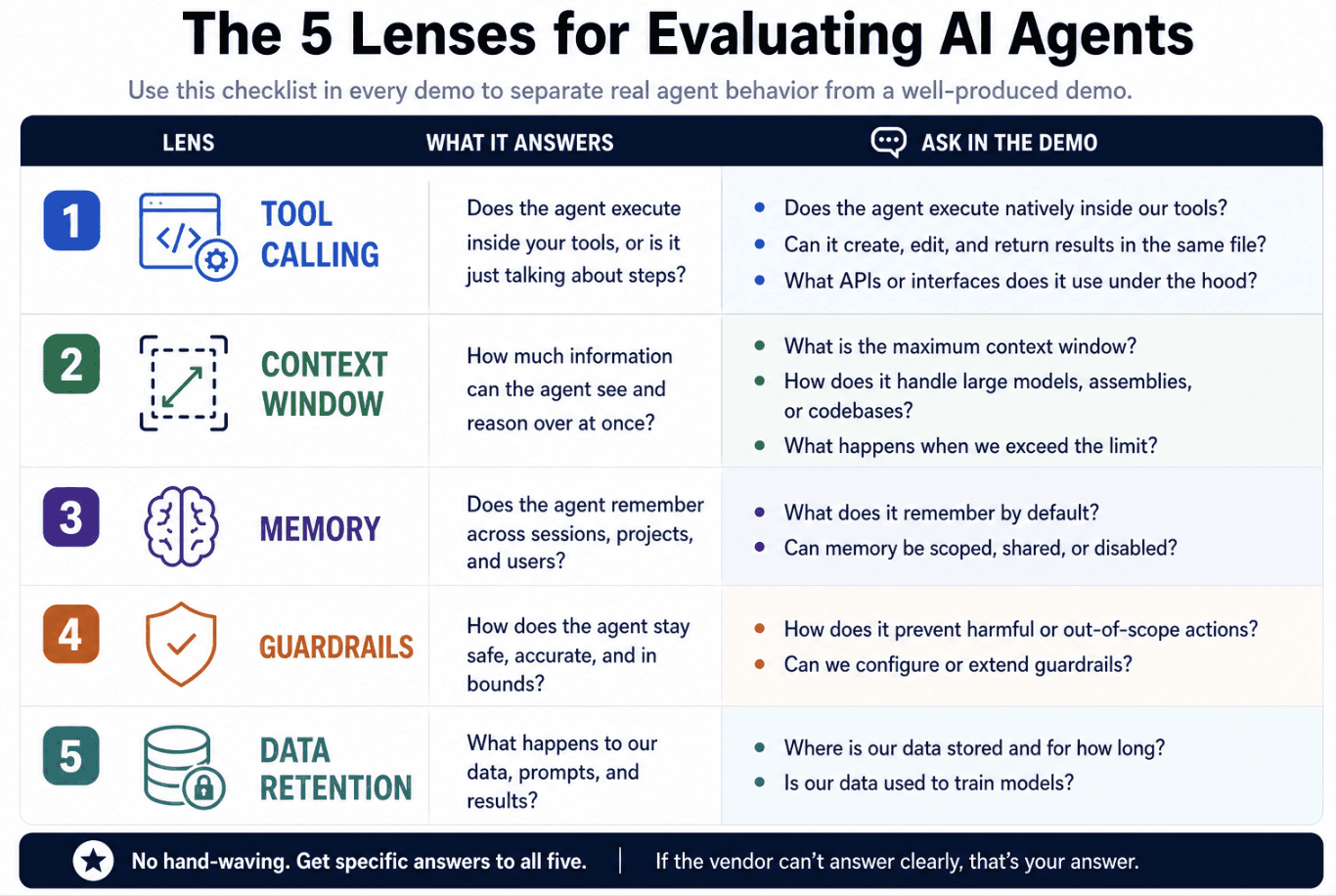
Five Lenses for Evaluating Any Vendor Demo
Five questions worth asking before any vendor gets a second meeting.
Tool Calling
Does the agent execute inside the tool, or does it narrate steps for you to run yourself? Ask directly whether the demo showed live execution or a scripted walkthrough of outputs generated separately. Native execution in Ansys means the agent sets boundary conditions, assigns materials, runs the solver, and returns the result inside the same open file. A tool that hands you a Python script or a PDF report with steps to follow is not executing anything. You are still doing the work.
Context Window
Does the agent hold your full assembly tree, or just one file at a time? An agent working from a fragment of your model is making planning decisions without the full picture. Ask whether context is scoped to a single file or to the broader assembly and downstream dependencies.
Memory and Skills
Does the agent retain your settings, material libraries, and drawing standards across sessions? A tool that resets every session cannot encode your team's conventions. Ask whether the vendor supports a skills or workflows layer that locks in your standards before execution begins and to guarantee scalability and consistency during full rollout. Your team may have spent years dialing in preferred mesh density, element types, contact definitions, and tolerance callouts specific to your product lines. Without a memory or skills layer, the engineer becomes a human clipboard, re-entering those conventions at the start of every session. A skills layer that persists those choices before execution begins is what separates a general-purpose tool from one that actually works the way your team does.
Guardrails
Can the agent be scoped away from released drawings and production data? Ask whether access controls are enforced at the agent level or only at the file system, and whether every action is logged and reversible. For a broader look at rolling out AI without exposing engineering IP, see secure AI adoption for engineering teams.
The concrete risk: an agent with write access to released drawings or production simulation files can overwrite a controlled revision without any flag in your version history. Proper guardrails mean the agent operates under a separate, scoped credential that carries no write access to released or locked items, and that every action the agent takes, including file opens, edits, and solver runs, writes to a full audit log tied to that credential. That log needs to show what changed, which file version was affected, and who or what authorized the action, so a reviewer can trace the chain from objective to output without relying on the agent's own summary.
Cosmon's AI Agent is built around a propose-only model: it never autonomously signs off on an action. Before executing a simulation setup, it asks clarifying questions, presents a full model summary, and waits for engineer sign-off. Every action is logged, traceable, and reversible inside your own environment. The Workflows feature grounds the agent in engineer-specified constraints before execution begins, acting as a check against design-intent drift. Engineering files never leave your infrastructure. When not deployed on-premises, data is processed under a zero data retention contract. Cosmon holds SOC 2 Type 2, CMMC, and TISAX certifications, and supports NIST 800-171 compliance for teams with defense or automotive supply-chain requirements.
On-Premises and Zero Data Retention
This matters more when geometry, simulation, and design IP are involved. Zero data retention means prompts and files are processed and stored nowhere by the vendor. On-premises means the software runs inside your own network entirely.
Three Questions That Filter a Real Demo from a Marketing Demo
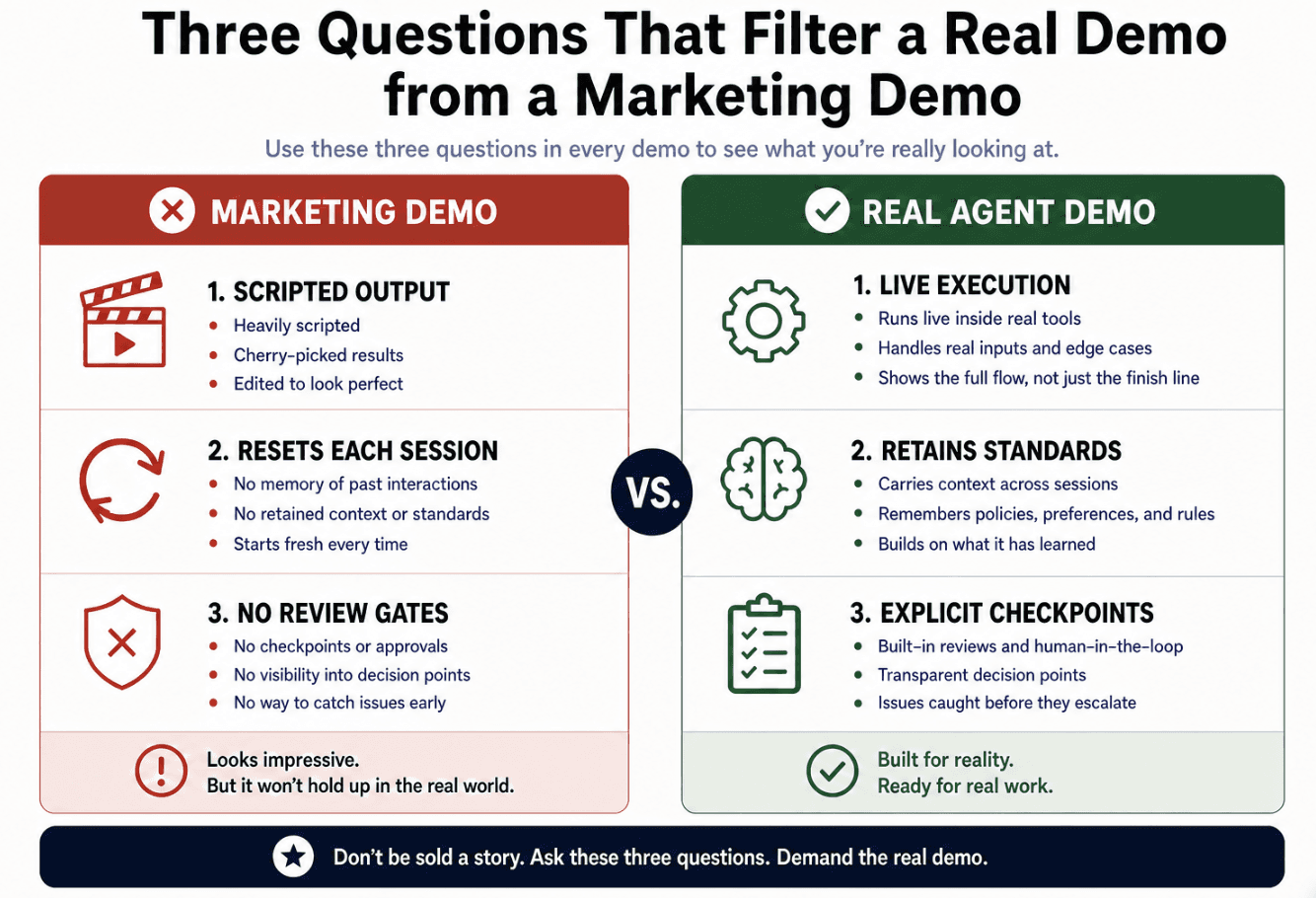
Run these three questions in order. A vendor who hedges on any of them is telling you something. For a broader scoring framework, Sthambh's agentic AI vendor evaluation checklist groups 30 questions into six categories with a weighted matrix you can adapt to your own procurement process.
Does your AI execute inside tools I already use, or only talk about them?
Ask the vendor whether the agent runs natively inside your tools or through a separate application that connects to them. Those are different products. A native agent operates inside SOLIDWORKS, Ansys, or whatever tool your team already runs, the model stays open, the agent acts on the feature tree or solver directly, and the result comes back in the same file. A connector-based approach routes your geometry through a separate interface, which introduces a translation step, a data handoff, and a point of failure. Ask for a live screen share. If the demo shows a rendered output or a downloaded report instead of the agent working inside the native environment, the vendor has built a bridge, not an agent.
Does your AI learn my team's standards, or reset every session?
Your mesh settings, material libraries, drawing conventions, and tolerance callouts took years to develop. An agent that forgets them between sessions is a generalist tool, not a team member. Ask whether there is a skills or workflows layer that persists those standards and grounds execution before the agent acts. "On the roadmap" is a no.
Where does your AI stop and ask me?
This is the question most vendors least expect. A real engineering agent has explicit checkpoints where it surfaces a decision, pauses, and hands the call back. Ask the vendor to show you one of those moments in the demo. If the agent ran the whole task without a review gate, that is not accountability, that is automation with a chat interface.
If a vendor cannot answer all three directly and show you the behavior live, that is the answer.
What This Means for Your Engineering Organization
The failure mode is quiet. A team buys what the vendor called an agent, rolls it out, and three months later the engineers are still setting up boundary conditions by hand. The tool is open in a browser tab, useful for drafting, occasionally handy for looking things up. It is not executing anything. For concrete examples of what genuine agent execution looks like in practice, see engineering AI agent use cases.
That gap costs more than the license fee. It costs the credibility of the person who signed off on the purchase.
The real evaluation question has nothing to do with whether a product uses AI. Almost everything does now. The question is whether it acts inside the tools your team already runs, carries your conventions and standards forward across sessions, and hands judgment calls back before executing them. If the answer to any of those is no, you have a text interface, not an agent.
To make it concrete: Cosmon's AI Agent runs inside SOLIDWORKS, Ansys, Abaqus, COMSOL, and other engineering software tools your team is already using. Before executing a simulation setup, it asks clarifying questions, presents a full model summary, and waits for sign-off. Every action is logged, traceable, and reversible inside your own environment. Geometry never leaves your infrastructure. The agent surfaces its reasoning at each step so you can check the logic behind it, not merely the output.
Roughly half of Cosmon's Agent usage involves analyses that generalist engineers could not previously attempt without specialist support. The agent opens up a category of work that was previously out of reach, and it does it without sending your geometry anywhere you did not approve.
Final Thoughts on Separating Real AI Agents from Well-Produced Demos
The five lenses and three questions here won't take long to run, but they will save your team months of frustration post-rollout. A vendor who can answer all three live, without rephrasing, is worth your time. If you want a baseline to compare against, Cosmon's AI Agent is built to answer all three directly.