AI Agent Use Cases for Mechanical Engineers: What a Real Evaluation Found (July 2026)
20 min read
July 2026

Claims about what AI can do for engineering teams are commonplace. “Does this actually work? Will it work on my models, and in my workflows?” What’s hard to find is proof.
A prospective customer ran a hands-on evaluation of Cosmon's AI agent and asked us to publish results across roughly 15 engineering tasks, testing the system entirely with their own files. They agreed to share their findings anonymously. The agent works natively in SolidWorks, ANSYS, Abaqus, and COMSOL, among many other tools, taking on specific, repeatable tasks directly in those tools and looping the engineer in on judgment calls.
Here's how Cosmon's agent did, grouped by the kinds of problems it solved.
Use Case | Tool | Result | Status |
|---|---|---|---|
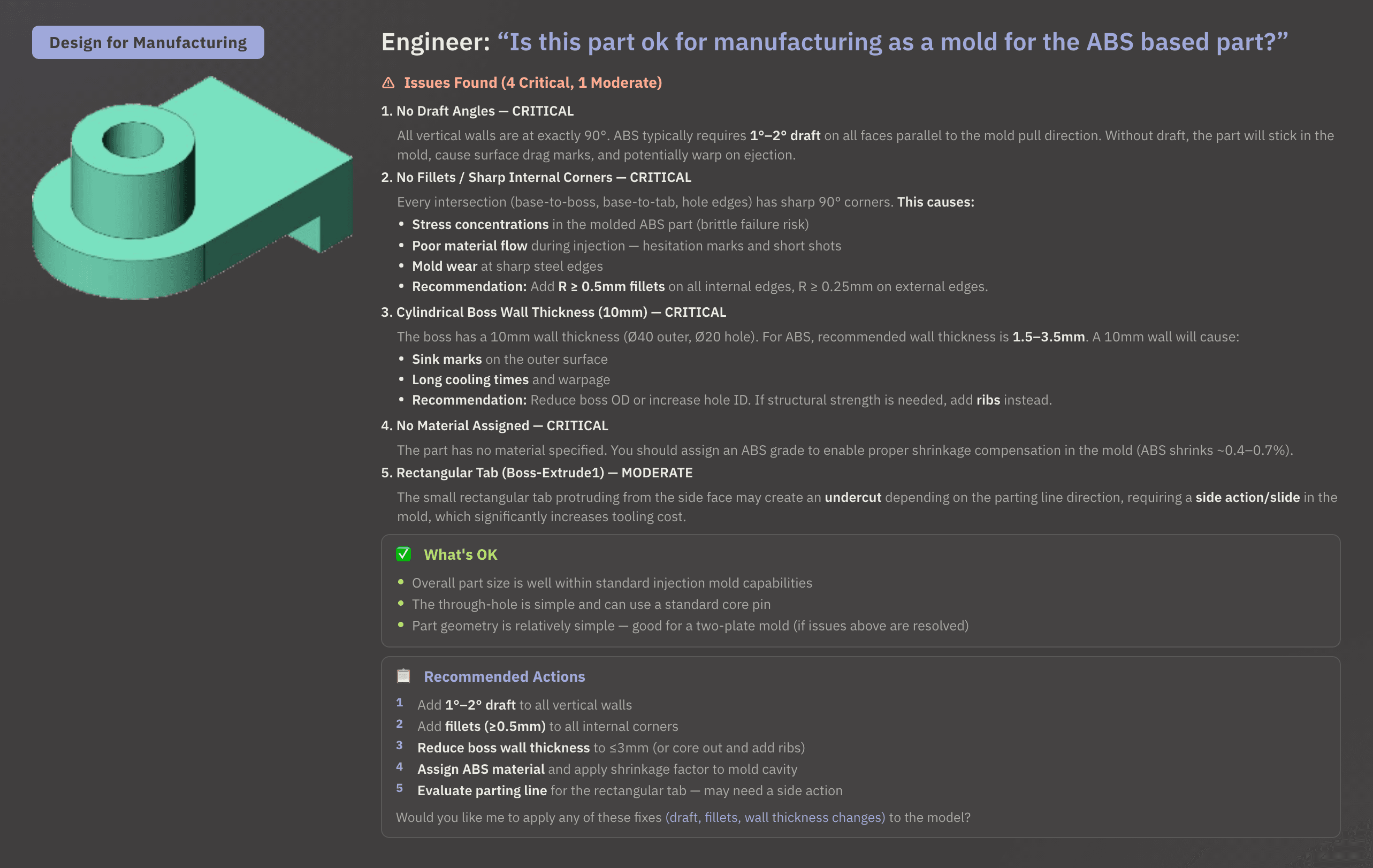
DFM review (ABS injection mold) | SolidWorks | 4 critical and 1 moderate issue flagged, each with affected feature and recommended fix; offered to apply changes directly | Completed |
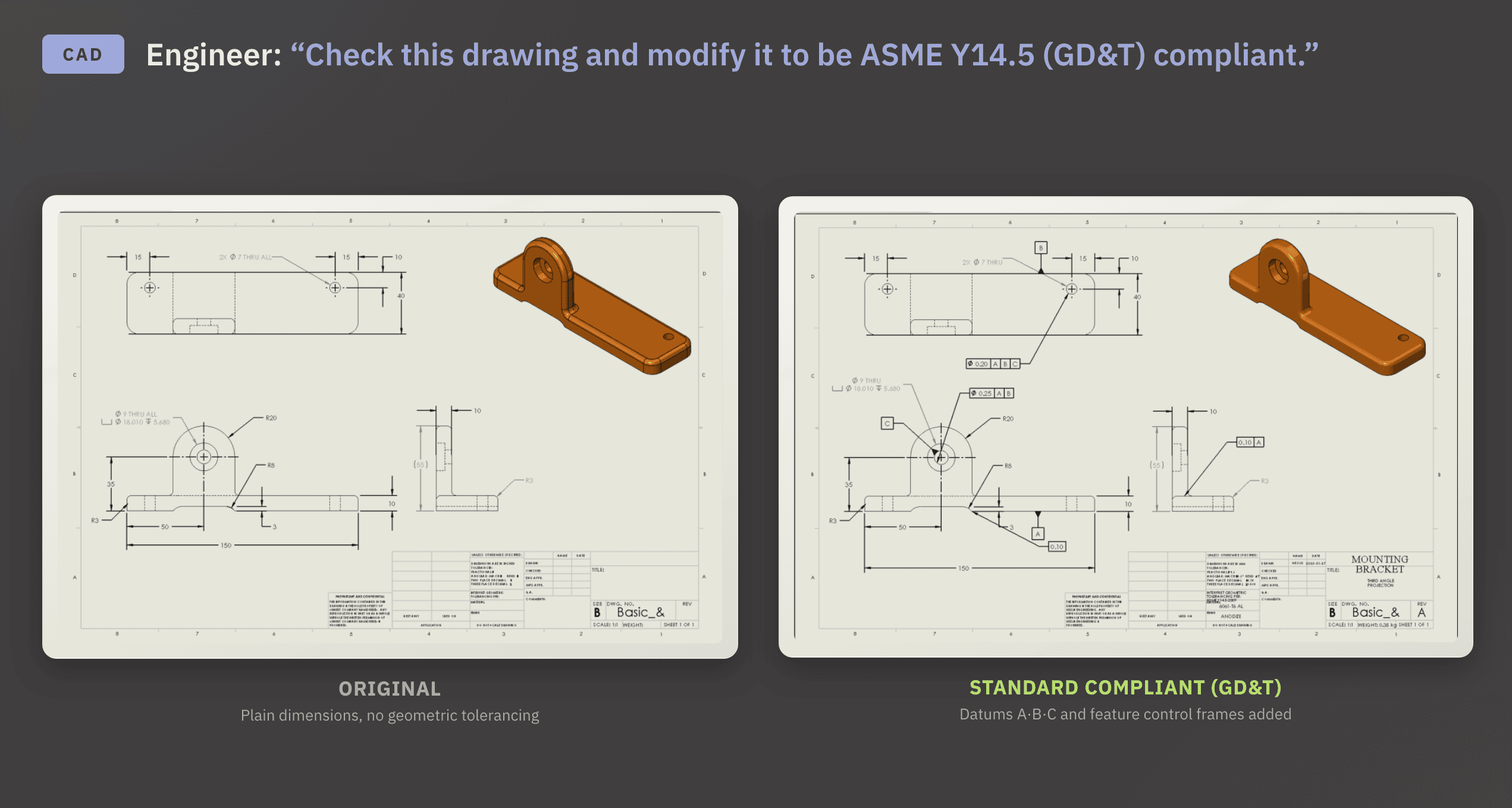
GD&T compliance check | SolidWorks | All non-compliant annotations identified against ASME Y14.5; original and corrected drawing returned side by side | Completed |
Tolerance stack-up (universal joint assembly) | SolidWorks | Worst-case and statistical tolerance-per-part values with assembly yield percentages; critical gap flagged for engineer sign-off | Completed |
CAE geometry error detection and repair | Solver kernel | Short edges and sliver faces identified by location; complete table of candidates sorted by edge index and length | Completed |
Bounding box generation (universal joint) | SolidWorks | Full dimensions returned; result saved as a 3D sketch feature in the model | Completed |
Assembly mass filter (components under 5g) | SolidWorks | 11 components highlighted in yellow; summary table of part names and masses returned | Completed |
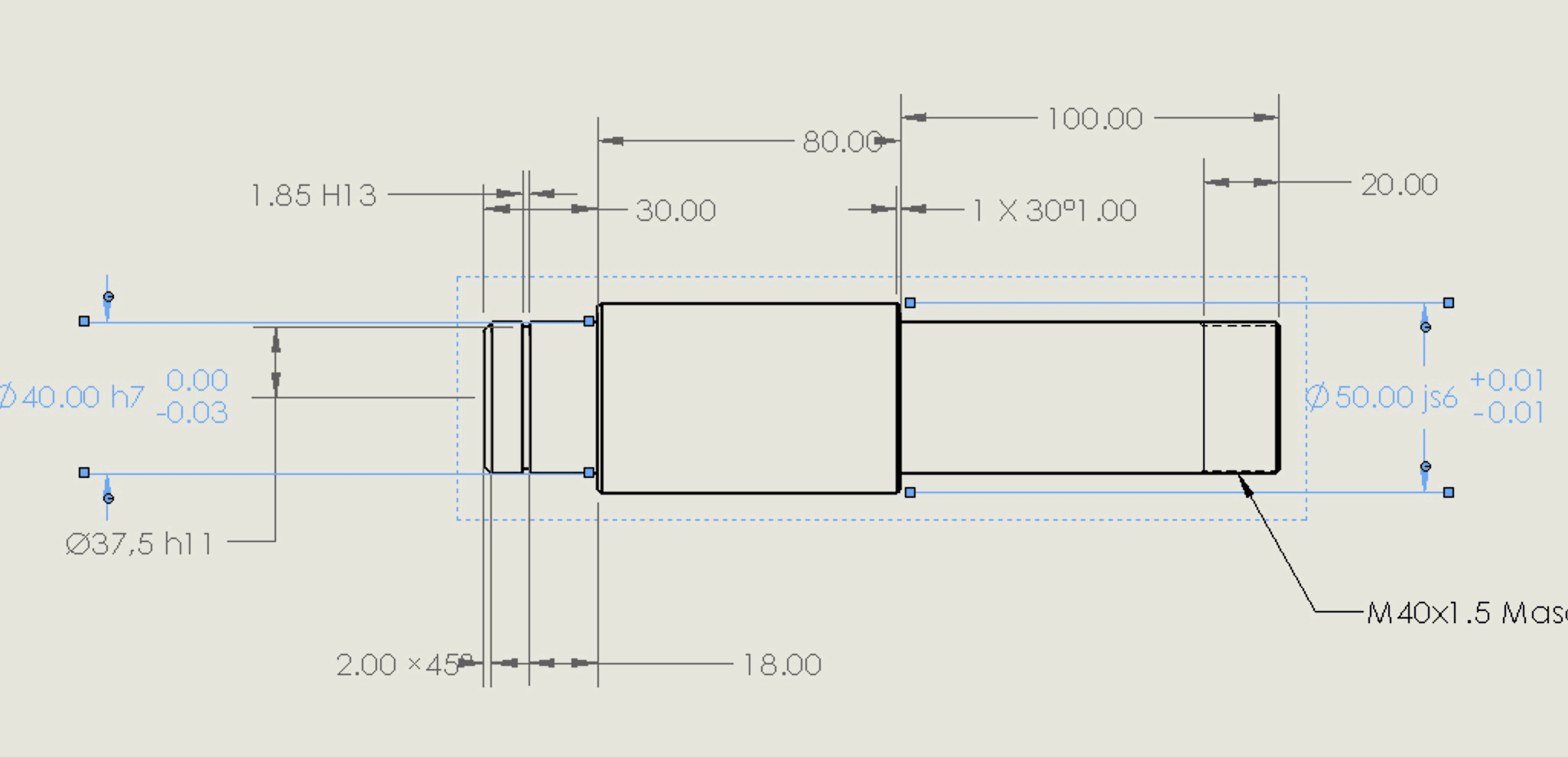
Drawing generation from STEP file | SolidWorks | Fully dimensioned drawing on A3 template; projection angle, view configuration, and dimensioning system auto-selected | Completed |
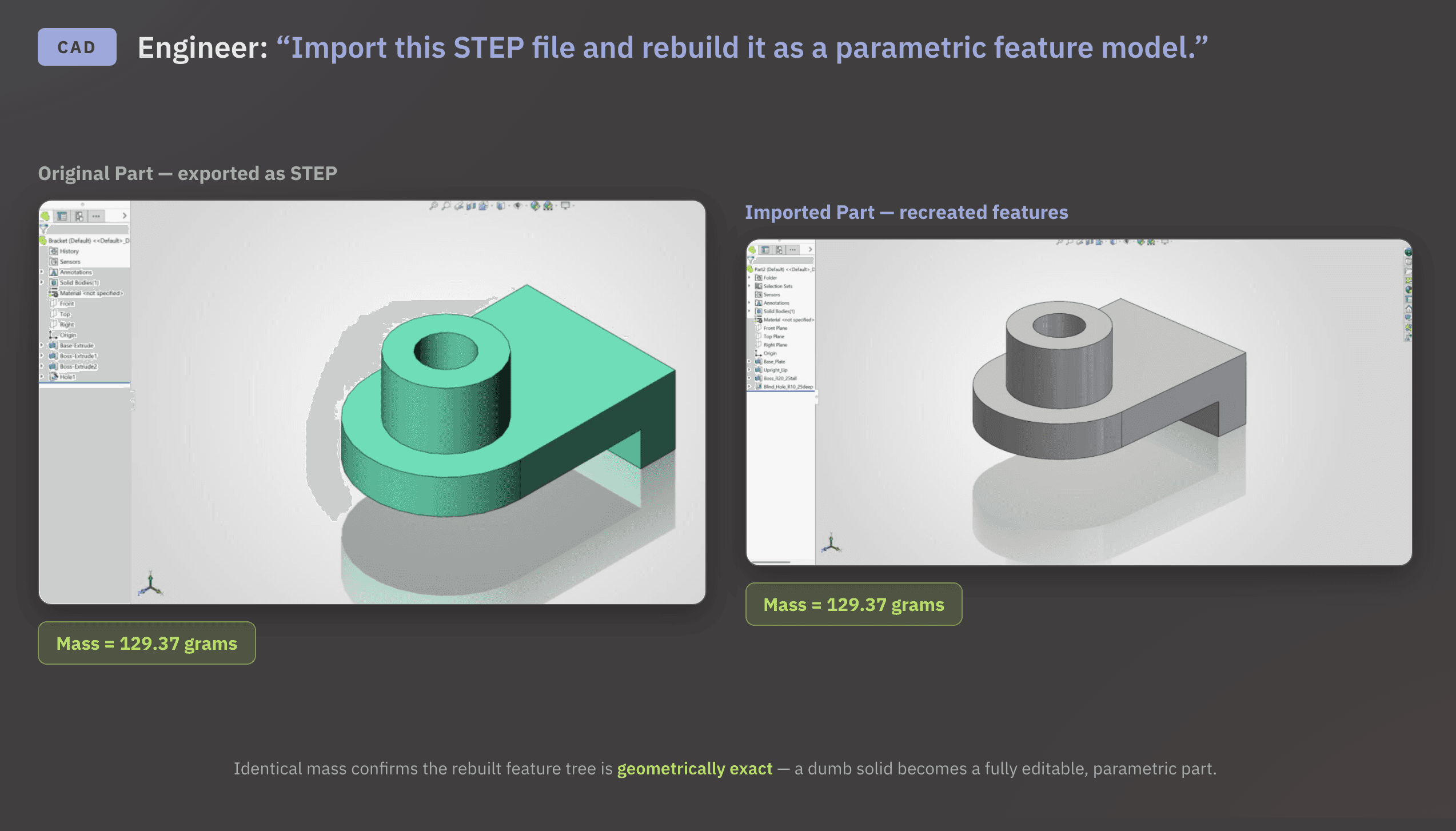
STEP to parametric conversion | SolidWorks | Fully parametric model with complete feature tree; mass matched at 129.37 grams | Completed |
Scan-to-parametric from point clouds | SolidWorks | Parametric models returned; knurl patterns and fine surface transitions came out simplified | Partial |
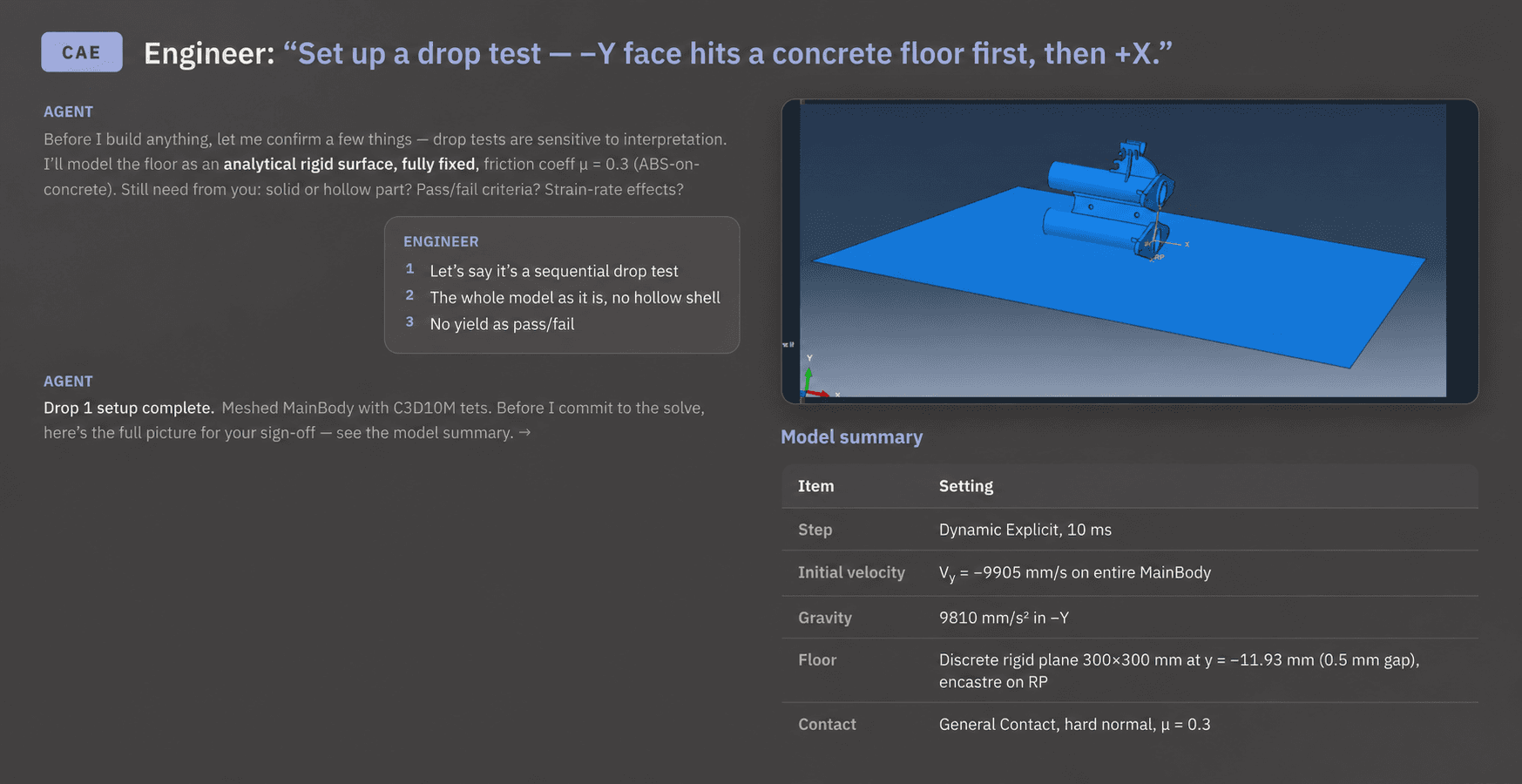
Drop test simulation setup | Abaqus | Full boundary conditions, steps, contact, and material parameters built; model summary presented for sign-off before running | Completed |
Johnson-Cook damage model (polycarbonate) | Abaqus | Complete plasticity and damage initiation parameter set returned with a structured reference guide on Abaqus material behaviors | Completed |
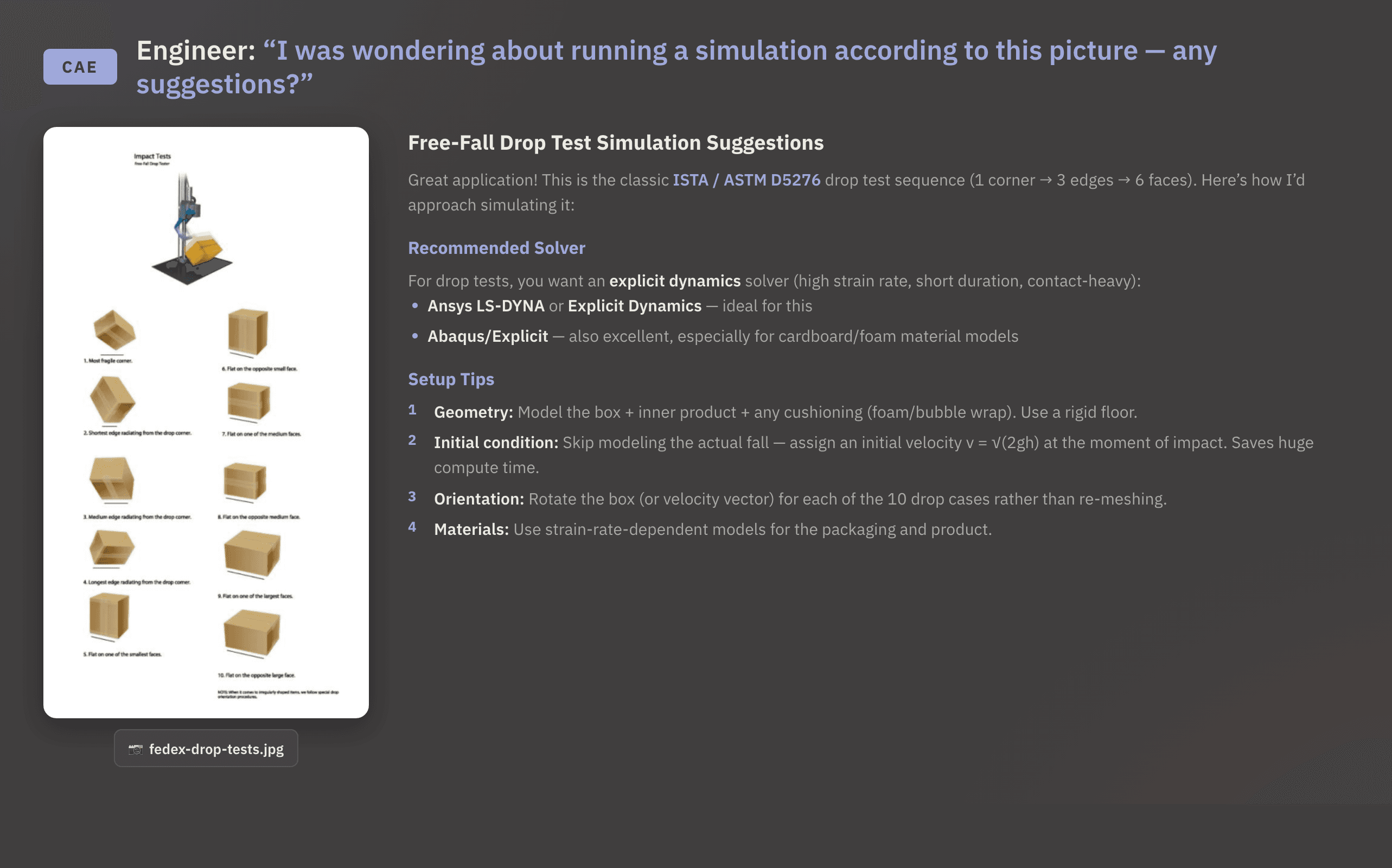
Drop test setup from spec sheet photo | No model file | Solver, setup approach, and orientation strategy recommended from photo alone; output tied to the specific test | Completed |
Abaqus material behavior decision guide | Abaqus | Practical reference covering elasticity, plasticity, and damage models, framed around problem physics | Completed |
CAD file from photo (baby stroller) | SolidWorks | Declined; explained missing depth, hidden geometry, and measurement data; pointed to appropriate tools | Declined |
Requirement checks across workflows
The most common bottleneck in engineering review isn’t the decision itself. It’s the setup work before the decision and administrative clicking to get the information you need. Finding what’s wrong, cross-referencing against a standard, and surfacing what needs attention is time-consuming and easy to miss. This was the agent’s strongest area in the evaluation.
CAD review and validation
The first standout improvement was a Design for Manufacturability (DFM) review of an ABS injection mold. The agent opened the part in SolidWorks, ran the check natively, and returned a list of findings ranked from critical to moderate. Four issues were flagged as critical, and a fifth was flagged as moderate. Each finding included the affected feature and a specific recommended fix, followed by a prompt asking whether to apply the changes directly to the model.
Using the agent for a GD&T compliance check told a similar positive story. The agent was given a drawing to verify against ASME Y14.5; the agent identified all non-compliant annotations and produced a corrected version. It also provided the original and the compliant version side by side, without the engineer having to manually cross-reference the standard.
The agent also ran a tolerance stack-up on a universal joint assembly, returning worst-case and statistical tolerance-per-part values with assembly yield percentages. It flagged the critical gap between the crankshaft bottom face and bracket top face for the engineer to approve before moving on, giving the team a clear signal on which part dimensions needed tightening.

Each of these tasks shares the same underlying pattern: the agent does the checking, and the engineer makes the call.
CAE geometry error detection and repair
On the simulation (CAE) side, imported geometry often arrives with a vague "imprecise geometry" warning from your solver kernel. Tracking down which edges and faces are causing the error is a manual, time-consuming process, and what would normally take several iterations of hunting through menus came back in a single pass.
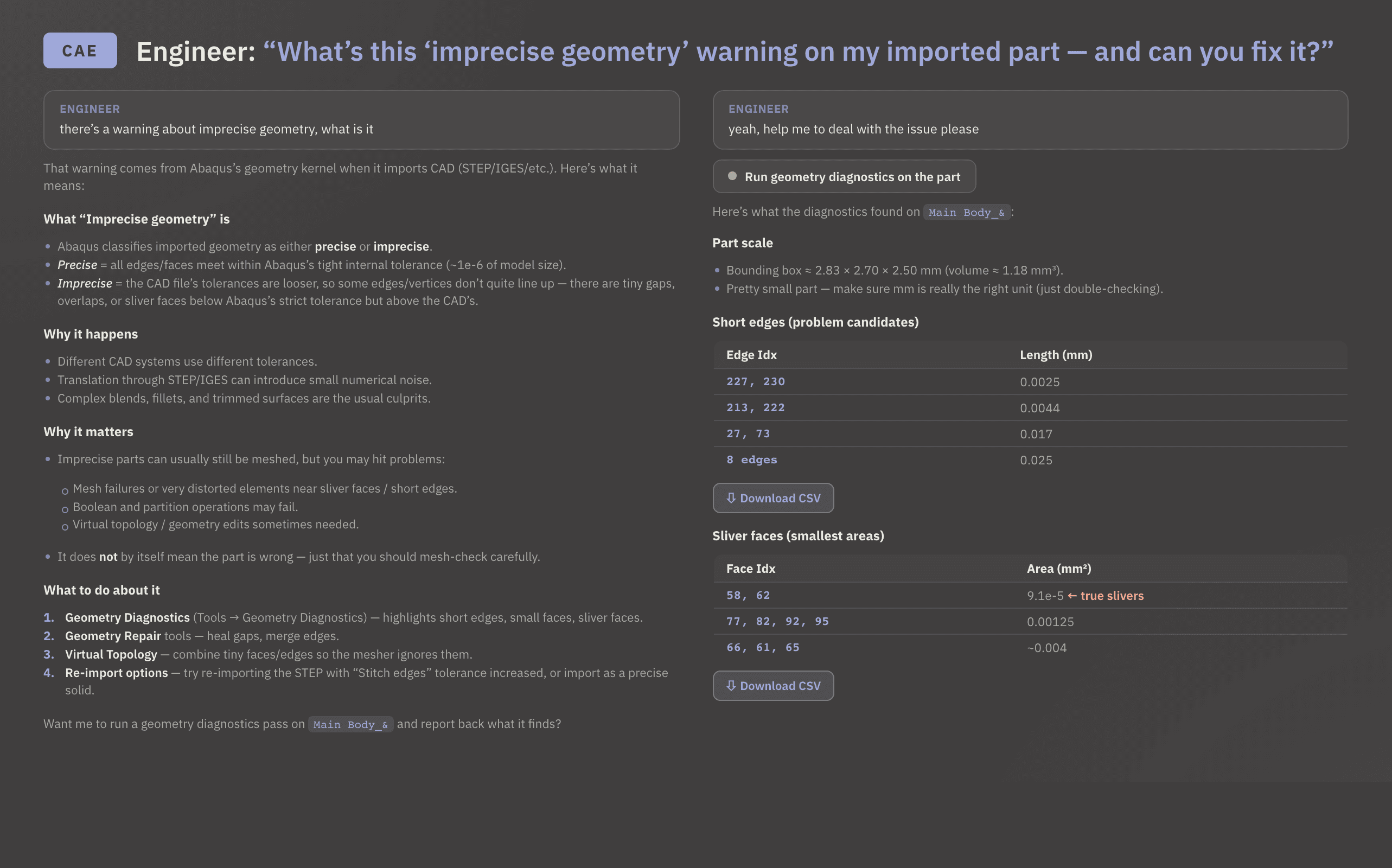
The agent ran the diagnostics, identified the short edges and sliver faces by location, explained why the kernel flags them, and returned a complete table of problem candidates sorted by edge index and length, with enough context to act on immediately.
Time-consuming model data retrieval
A large share of engineering time is spent answering questions the model can already answer. The issue isn't finding the answer; it's the interruption. Stopping what you're doing, clicking through menus, clicking through components one by one, and then trying to find your place again pulls you away from the work that actually requires your judgment. Context switching comes at the cost of a large percentage of an engineer's time.
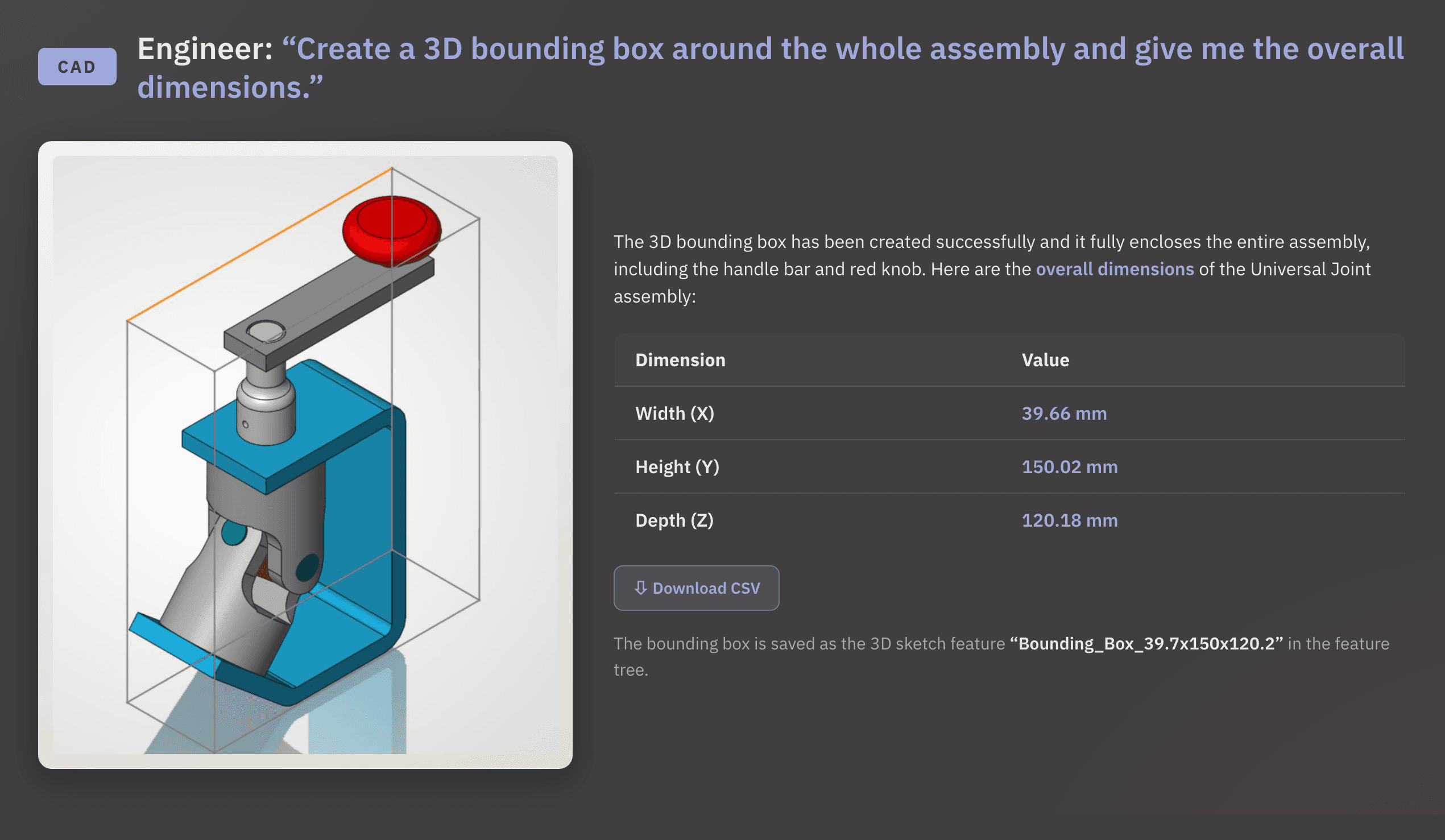
When asked to generate a bounding box for a universal joint assembly, the agent returned the full dimensions and saved the result as a 3D sketch feature.
When asked to filter an assembly by mass to better understand the model, the agent highlighted all 11 components under 5g in yellow and returned a summary table listing each part name and mass.
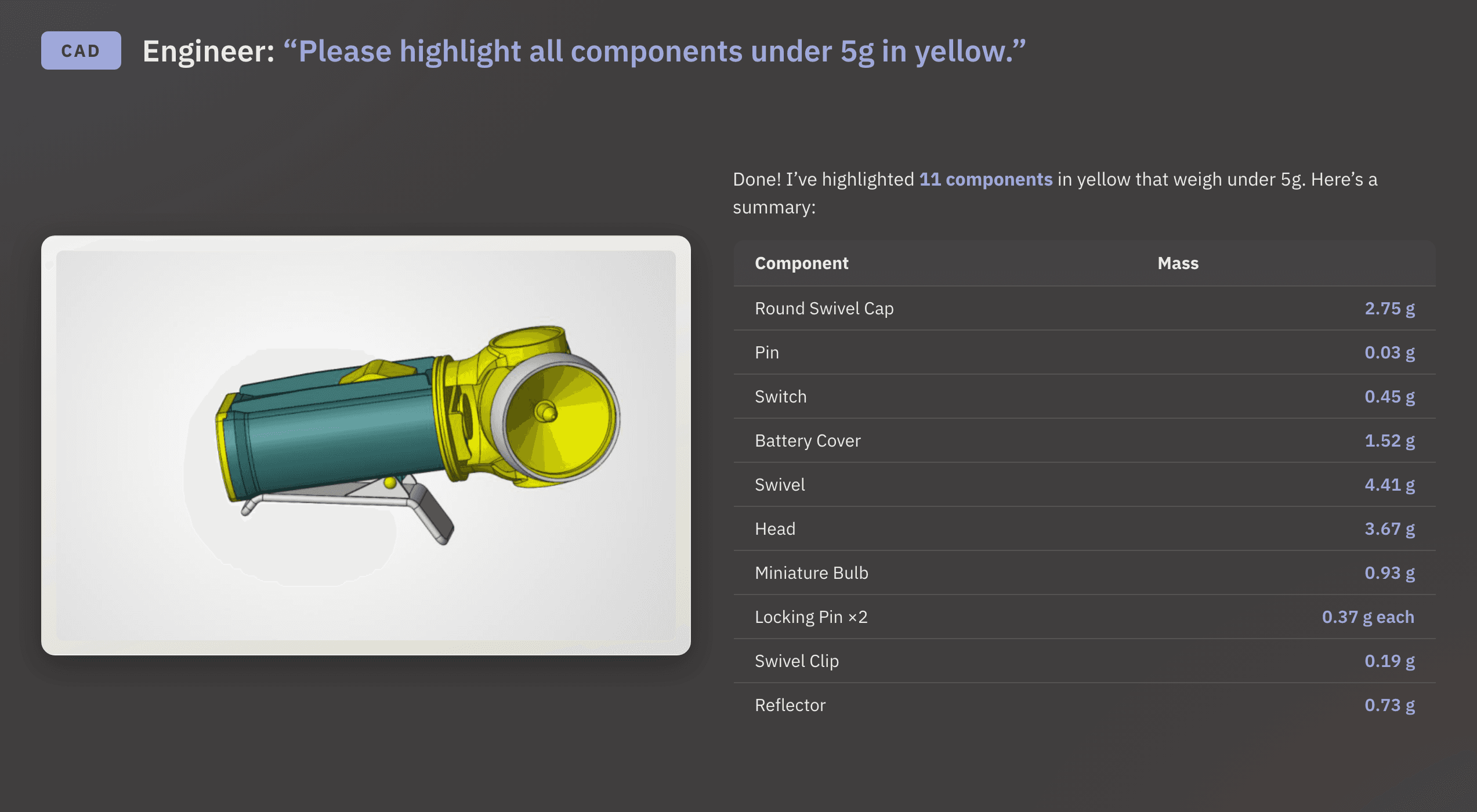
Both answers came back in a single prompt. The engineer never had to leave the problem they were actually solving. The answers were there and saved before the engineer would have finished clicking through to the right menu. This frees up an engineer to do higher-value work.
Model outputs, modifications
3D to 2D
Some tasks aren’t about finding a problem. They’re about turning what’s already there into something usable.
In this evaluation, the agent handled both ends: producing deliverables from existing geometry and reshaping geometry to meet a new requirement.
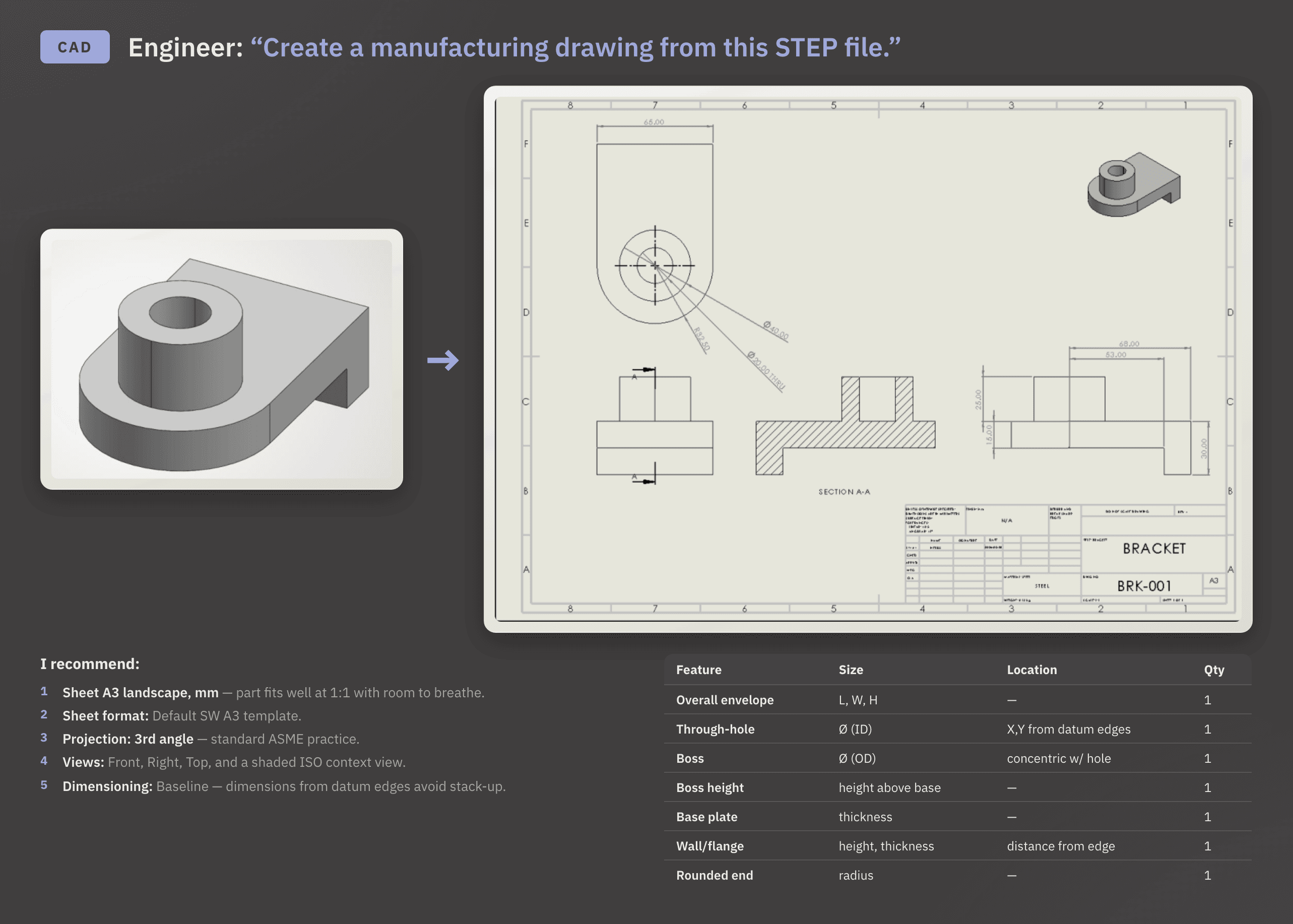
Given a STEP file of a bracket, the agent generated a fully dimensioned drawing on a standard A3 template, selecting the projection angle, view configuration, and dimensioning system based on the part geometry and standard practice. This is a task that would normally require an engineer to manually set up every parameter.
STEP to Parametric
It also imported a STEP body and recreated it as a fully parametric SolidWorks model with a complete feature tree and a matching mass of 129.37 grams. A dumb STEP body is geometry you can read. A parametric model is geometry you can change. With the feature tree in place, any downstream edit (wall thickness, fillet radius, a mounting boss) is a direct modification instead of a rebuild from scratch. Done by hand, that reconstruction can consume most of an engineering afternoon.
Limitations
There was one miss in this category: reverse engineering from scanned data.
The agent approximated geometry from two point clouds but didn’t fully reproduce fine surface detail. Knurl patterns and subtle transitions came out overly simplified. It did complete both tasks and returned parametric models.
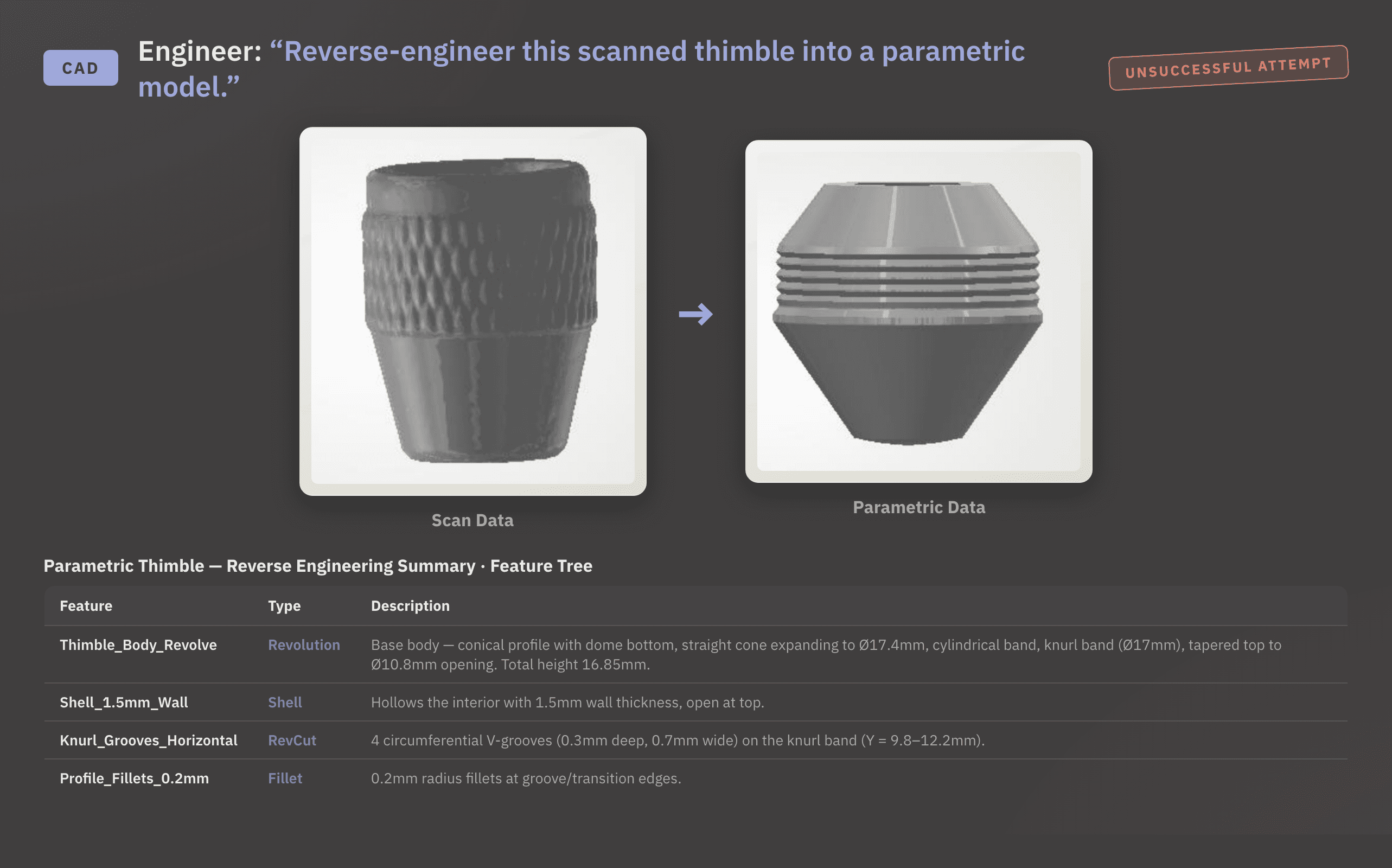
For scan-to-parametric workflows with complex surface detail, the output is directional instead of definitive at this time, given the agent's current capabilities.
Pre-Solve simulation setup challenges
Cosmon's agent excels at the structured, repeatable work required before a simulation : building boundary conditions, configuring steps, setting up contact, and assembling material parameters. These tasks often consume many engineering hours before the first iteration begins.
For a drop test that was performed Abaqus, the agent asked clarifying questions before committing to anything: whether the drop sequence was two independent cases or a single tumble drop, whether the part was solid or hollow, and what the pass/fail criteria were.
Once the engineer confirmed the parameters, it built out the full setup and presented a complete model summary for sign-off before running. Nothing was handed back as a macro to review; the setup was done inside Abaqus, visible, editable, and traceable.
The agent also assembled the full parameter set for a Johnson-Cook damage model in Abaqus for polycarbonate. It returned plasticity and damage initiation parameters along with a structured reference guide on when to use each Abaqus material behavior. The Johnson-Cook model requires strain rate sensitivity coefficients, thermal softening exponents, and damage initiation criteria that span multiple Abaqus input sections - values that are easy to mis-assign or pull from the wrong source if you're working from memory. For engineers who work across material types, this kind of output cuts down the time spent checking documentation before a run and reduces the risk of setting up the wrong model for the physics at hand.
When Cosmon’s AI agent is a thought partner
Not every problem comes with a model file attached. Sometimes the engineer needs a partner before touching any geometry. They need a way to work through the setup logic, sanity-check an approach, or understand what a standard actually requires before committing to a workflow.
Given only a photo of a drop-test specification sheet, the agent read the test sequence and recommended a solver, setup approach, and orientation strategy. It identified the test and reasoned through geometry, initial conditions, and material considerations without access to a model file. The output was specific enough to act on with a structured recommendation tied to the test the engineer was running.
It also produced a decision guide on when to use each Abaqus material behavior, covering elasticity, plasticity, damage models, and more, framed around the problem's physics instead of material type alone. The guide was structured as a practical reference that an engineer could use across projects and beyond the task at hand.
Limitation
When provided a photograph of a baby stroller and asked to generate a CAD file, the agent declined. It explained why this wasn’t feasible in SolidWorks, citing the lack of depth, hidden geometry, and measurements. It pointed the user to the right tools to use for that workflow.
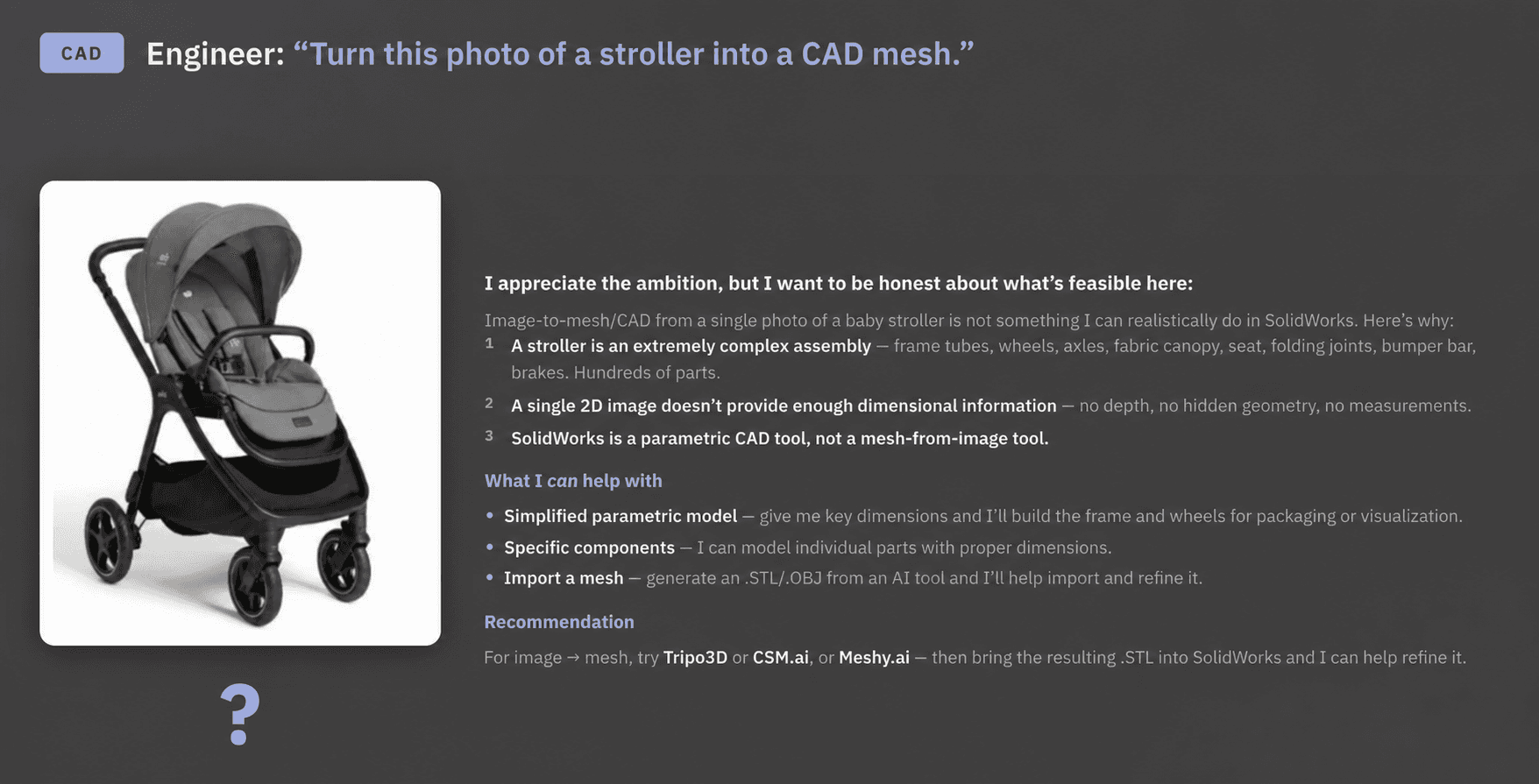
Though 2D to 3D is possible with agentic AI, this level of complexity is too much for an agent today, and the task needs to be broken into smaller part-level work. Knowing what’s out of scope and saying so is part of what makes Cosmon’s agent trustworthy on the tasks it accepts.
Try Cosmon’s AI Agent on one workflow
Curious about how agents are different from LLMs and chatbots? Start here.
But the fastest way to understand what the agent can do for you is to run it on a task you'd normally execute yourself. Choose a part you'd review feature by feature, a drawing you'd build from scratch, or a simulation setup you'd configure by hand. Then start a free trial with Cosmon and see the difference yourself.
FAQ
What tasks did Cosmon's AI agent actually complete in the evaluation, and which ones fell short?
The agent completed roughly 15 tasks using the evaluator's own files: DFM checks, GD&T compliance verification, tolerance stack-ups, CAE geometry error detection, bounding box generation, assembly mass filtering, drawing generation, and full pre-solve simulation setup in Abaqus. It fell short on two tasks: scan-to-parametric conversion with fine surface detail (knurl patterns and subtle transitions came out simplified) and generating a CAD file from a photograph of a stroller, which it declined and explained why.
Can Cosmon's agent set up an Abaqus drop test simulation without me configuring boundary conditions by hand?
Yes. The agent asks clarifying questions first (drop sequence type, solid versus hollow, pass/fail criteria), then builds the full setup inside Abaqus: boundary conditions, steps, contact, and material parameters, logged and ready for your sign-off before anything runs. It also assembled the complete Johnson-Cook damage model parameter set for polycarbonate, with references, reducing the risk of pulling coefficients from the wrong source.
How does Cosmon's AI agent handle tasks that are outside its current scope?
It declines and tells you why. When asked to generate a SolidWorks file from a single photograph, the agent explained the missing depth, hidden geometry, and measurement data that make the task infeasible, then pointed toward the right tools for that workflow. Knowing what to refuse, and saying so clearly, is what makes the results on accepted tasks credible.
Cosmon's AI agent vs a general-purpose LLM for GD&T compliance checks: what's the difference?
A general-purpose LLM gives you text about ASME Y14.5. Cosmon's agent opens the drawing in SolidWorks, runs the check natively, identifies every non-compliant annotation, and returns the original alongside a corrected version, without the engineer manually cross-referencing the standard. The output is a corrected drawing, not advice about how to produce one.
How does Cosmon's agent work across SolidWorks, ANSYS, Abaqus, and COMSOL without requiring a separate review step for each tool?
The agent runs natively inside each tool, not sitting alongside it, so actions are logged and visible within the environment you already work in. Every step is traceable and reversible from inside your own toolchain: no export, no parallel interface, no separate audit trail to sort out after the fact.