AI Copilots vs. AI Agents for Engineers: What's the Difference? (July 2026)
9 min read
AI chatbots generate text; AI agents execute tasks inside your tools. See what that difference means for mechanical engineers in real workflows.
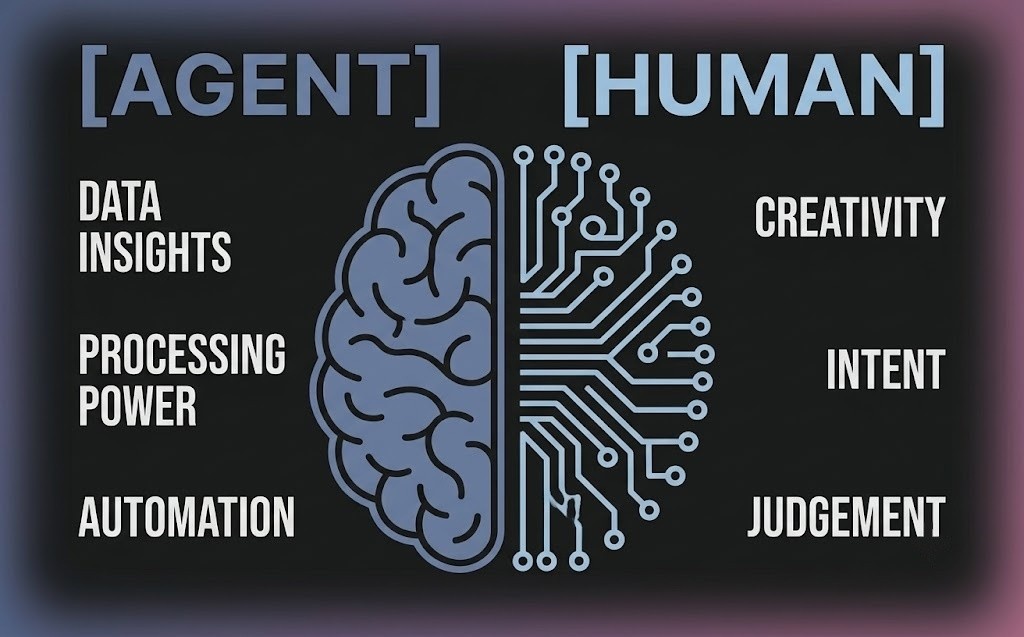
You paste a mesh error into ChatGPT. It tells you what to check. You open your solver, find the flagged cells, and fix them yourself. Most engineers working today have run into exactly this with AI copilots, also known as AI chatbots: you get an answer, but the work is still yours to do.
AI Chatbots can be a useful and knowledgeable sounding board when you need help with engineering questions or additional data. But when the conversation ends, you're still the one opening your tool of choice, making the changes yourself.
An AI agent changes that. You might use the same prompt as you would for a copilot, but the output is very different; instead of guidance, you get execution - or, actually performing the work to be done, given a goal.
TLDR:
AI chat tools respond with text; an AI agent opens your files, runs the work, and hands back results for your sign-off
Chatbots can't touch your assembly or verify their own output - the execution stays on you
A Formula SAE CFD study that takes a senior engineer ~12 hours took half the time with an agent driving mesh through post-processing
Agents handle repeatable tasks like DFM checks, mesh iteration, and boundary condition setup - judgment calls stay with the engineer
Cosmon's agent executes natively inside SolidWorks, ANSYS, Abaqus, CREO, and other engineering software tools you already use, flagging decisions that need your input
What an AI copilot does for engineers
An AI copilot is, at its core, a chat interface built on an LLM. You describe what you want, and it responds with text. That text could be a set of instructions, code snippets, or even parameter suggestions. The output is always text, and acting on it is always your job.
These tools can suggest commands, answer questions about menu options, and help you find the right dialog. They don't hold files or understand your assembly structure, and they can't go in and verify whether the code or procedure they suggested works. That's still your job. For a deeper look at why this matters, see the AI copilot trap in engineering.
To demonstrate the differences, imagine entering this prompt into a copilot: "Can you open and modify my flywheel assembly per the attached engineering change order?"
A copilot cannot touch your assembly file. It will instead describe the steps you need to take to make the changes yourself. It might even generate a macro you'll need to review and run. But everything that needs to happen within your flywheel assembly is on you. If the macro has a bug, you will find out once you run it and it breaks. If any of the downstream mates are affected, you will find out once the assembly throws an error.
What an AI agent does for engineers and why Agentic AI is a game-changer
An AI agent isn't a smarter chatbot; it's a different category of tool, because an AI agent acts while a chatbot responds. An AI agent lets an engineer take on the role of directing the work versus doing the work.
An agent can hold context across steps, plan a sequence of operations, execute them inside your tools, verify the output, and report back, flagging anything that needs your judgment before moving on.
With this in mind, let's look back at the same flywheel prompt from above, but this time the query is asked to Cosmon's agent. Instead of a text response with the actions for you to perform, the agent takes action.
It opens the file, reads the ECO, identifies the affected features and mates, applies the specified changes, and surfaces the result for your review. It operates natively inside tools like SolidWorks (see drawing automation) and understands the broader assembly context, cutting the manual steps from your workflow.
If something requires a call only the engineer can make, whether that's a design trade-off, an ambiguous spec, or something that lacks sufficient context, it will pause and ask for input instead of guessing.
The comparison table tells this story directly. The input is the same: a plain-language prompt. But the output for a copilot is text, while the output of an AI agent is execution, with full transparency of actions taken.
Chatbot | Other "Agents" | Cosmon's Agent | |
Underlying technology | LLM | LLM + web interface | Agentic AI |
Chat interface | ✓ | ✓ | ✓ |
Higher-level engineering reasoning and intent | ✗ | Partial | ✓ |
Operates natively inside engineering tools | ✗ | ✗ | ✓ |
No separate tool or file uploads required | ✗ | ✗ | ✓ |
Loops in user for critical engineering decisions | ✗ | ✗ | ✓ |
Understands and applies organizational best practices | ✗ | ✗ | ✓ |
Verifies its own output | ✗ | ✗ | ✓ |
This contrast is what the word "agentic" means in practice. A copilot functions as a sounding board within a chat window; a true agent acts as an autonomous team member. This team member is the one that can be handed a task and trusted to work through it, flag what needs your judgment, and deliver a result.
Two Examples: CAD Automation and End-To-End Simulation with and without an AI agent
The copilot/agent split is defined by behavior: a copilot advises, while an agent executes. This distinction plays out across a range of engineering use cases, but to see exactly where that line is drawn, here are two specific examples in CAD and Simulation.
CAD automation: a design for manufacturing review with an AI agent
Using a copilot, a mechanical engineer might prompt: "Is this part okay for manufacturing as an ABS injection mold?"
A copilot would explain what to look for: draft angles, fillets/sharp internal corners, wall thickness, or potential undercuts, and would leave the inspection to the engineer. The engineer would then work through each issue manually, deciding which changes to make and begin implementing them one by one.
Fed the same prompt, Cosmon's agent delivers a completely different output.The agent would open the part, run the Design for Manufacturability (DFM) check natively, and return a tiered list of findings ranked from critical to moderate. Each issue would also include the affected features and a specific recommended fix.
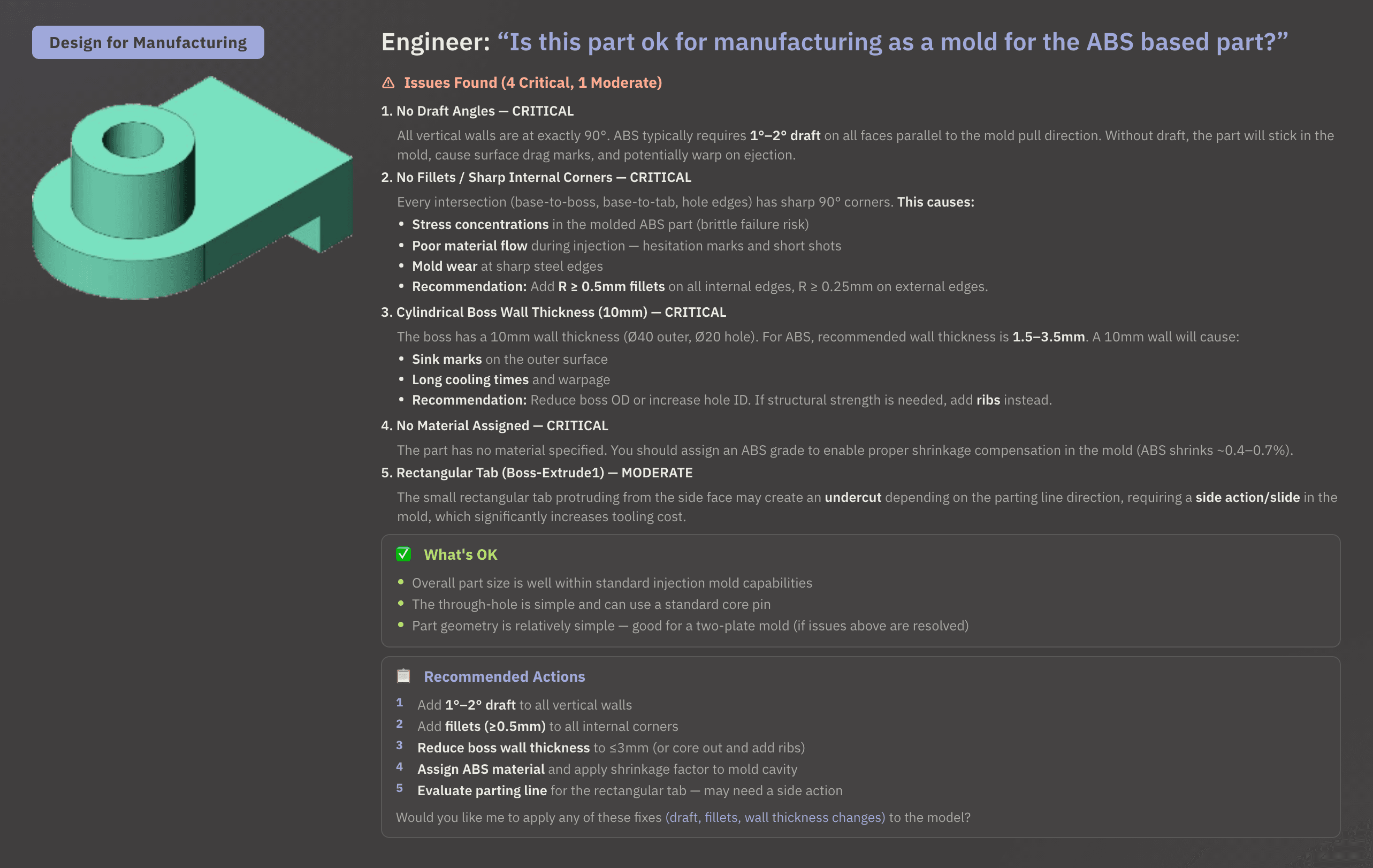
Now, instead of the engineer manually making these changes, as in the previous example, the agent would actually apply the fixes - this is how you use AI to get better, manufacturing-ready designs.
CAE simulation automation: a Formula SAE aerodynamics deep look
A Formula SAE engineering team ran a full external aerodynamics CFD study on an open-wheel race car in ANSYS Fluent, with Cosmon's agent driving the workflow from geometry through post-processing.
Without AI, setup, execution, and post-processing take a senior CFD engineer approximately 12 hours of manual work. With the agent, the same study took half the time, with time savings distributed evenly across mesh generation, case setup, and post-processing.
The half-car geometry was imported live from SpaceClaim. The agent proposed mesh settings and predicted cell counts before running, then iterated through five convergence passes, optimizing the mesh size by 85% while landing on a predicted L/D ratio of 1.57. All post-processing, including velocity contours, wall shear stress, stream traces, and wake envelope, was generated without manual scripting or clicking in Fluent.
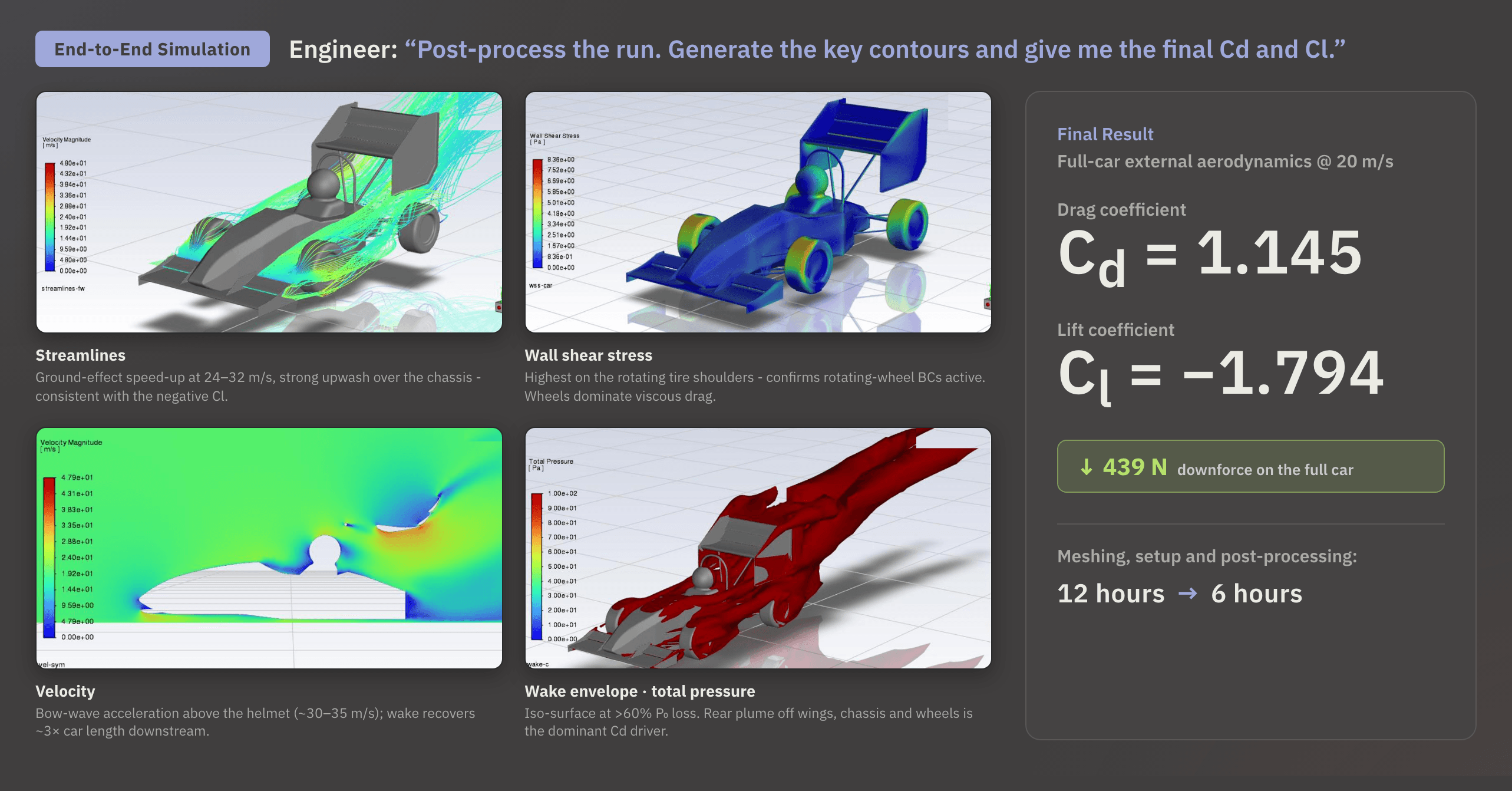
After the run, the agent led with a mesh-physics caveat: the current mesh (2 prism layers, y+ mostly 30 to 250, no wake refinement behind the wheels or rear wing) carried an estimated ±10 to 15% uncertainty on pressure drag, so its recommendations were flagged as directional, best confirmed with A/B comparisons on the same mesh.
With that caveat noted, it returned five geometry changes ranked by L/D gain per unit of effort:
Front-wing second element with endplate curl
Aggressive diffuser with floor strakes
Front-wheel turning vanes
Rear-wing Gurney flap
Roll-hoop fairing
All five tied back to two drivers: drag (dominated by the wheels and wake) and downforce (loaded through the underbody and front-wing vortex).
The highest-priority quick win: front-wheel turning vanes, for its low effort and immediate drag benefit. Before acting on any of it, the agent recommended refining the mesh first, 5 to 8 prism layers, y+ in the 30 to 80 band, within a 1 million cell budget, to remove the pressure-drag uncertainty.
The result was a study the team could act on, with a clear, mesh-validated direction for the next design iteration.
AI agents and engineers must work together
The narrative around autonomous AI often oversells, and it's worth stating directly, especially for the engineer thinking "I've been doing engineering for fifteen years, and no AI is better at this than I am." That thought is not wrong.
An agent doesn't replace an engineer's critical reasoning or decades of accumulated skill and context. It takes over the tedious setup and computational grind, freeing the engineer to focus on the decisions that actually require their expertise.
Cosmon's agent is not a generative CAD system. It doesn't invent geometry, doesn't hallucinate structural solutions, and doesn't autonomously approve designs or sign off on anything. It relies on the engineer to understand design intent, and it won't replace judgment on the calls that require it. It always requires the engineer to accept or reject a recommendation.
What it removes is the friction between the engineer and the manual work of engineering. Tasks like CAD automation, mesh convergence iteration, DFM checks, drawing creation, and boundary condition setup are repeatable and time-consuming. They don't require fifteen years of engineering judgment to execute.
“The agent handles 80% of the repetitive work, while the engineer handles the remaining 20%.”
Cosmon's agent does not disrupt an existing environment. It helps engineers manage work natively inside most major tools engineers already know, like AutoDesk, CREO, Siemens NX, Star-CCM+, SolidWorks, ANSYS, Abaqus, COMSOL multiphysics and more. For teams with enterprise security requirements, SOC 2 Type 2 compliance, zero data retention, and on-premise deployment are also available.
Mechanical engineers are having their AI moment
Software developers already have tools like GitHub Copilot, and Claude Code. Suddenly a task that took an afternoon took twenty minutes and the experience of writing code felt genuinely different. It wasn't just faster; it felt like a different job. Developers stopped grinding through implementation details and started thinking at a higher level, directing the work instead of doing all of it by hand.
For mechanical engineers, that moment has arrived - and in 2026, it is already underway. The tools have gotten better over the years, simulation software is more powerful and CAD is more capable, but the way engineers spend their time has stayed stubbornly the same. Clicking through the same dialogs, running the same manual checks, building the same contour plots by hand.
Cosmon's agent is what changes that. It's not a smarter search bar or a chatbot bolted onto your toolbar. It's a true agent that opens your files, runs your analyses, iterates through convergence, and flags what needs your judgment. And all of this occurs natively within the tools you already use.
The Formula SAE team didn't wait for a future version. They ran a full aerodynamics study and got results in half the time a senior engineer would have spent doing it manually.
Try Cosmon’s agent on one workflow
Imagine if every engineer on your team could save hours of time every week - how much faster could your team move? Launch new products? The fastest way to understand the difference is to experience it on a task you'd normally think through and click through manually. Pick one: a mesh you'd normally iterate by hand, a part you'd review feature by feature, or a drawing you'd build from scratch. Then, start a free trial and experience the difference yourself.
FAQ
What is the difference between AI copilots like ChatGPT or Claude and Cosmon's agent for engineering work?
A copilot responds with text - instructions, code snippets, parameter suggestions - and leaves the execution to you. Cosmon's agent opens your files, runs the work inside tools like SolidWorks or ANSYS, and hands back results for your sign-off. The input can be the same prompt; the output is either a description of what to do or the thing already done.
Can Cosmon's agent run a full CFD simulation in ANSYS Fluent without me clicking through setup manually?
Yes. In a documented Formula SAE aerodynamics study, the agent drove the full workflow in ANSYS Fluent from geometry import through post-processing - proposing mesh settings, iterating through five convergence passes, and generating velocity contours and wake analysis without manual scripting. The same study took a senior CFD engineer roughly 12 hours to complete manually; with the agent running it, the time was cut in half.
How do I know Cosmon's agent isn't making changes I can't audit or reverse?
Every action the agent takes is logged, traceable, and reversible within your own tools. Nothing happens outside your environment, and no files leave your infrastructure. The agent surfaces its reasoning step by step during execution, so you can inspect why it took each action and what it did. Anything flagged as a judgment call is handed back to you before the agent moves forward.
AI agent vs. AI copilot for mechanical engineers: which one actually saves time on simulation workflows?
An AI agent saves time on simulation workflows because it executes the work - mesh iteration, boundary condition setup, post-processing - rather than describing how you should do it yourself. A copilot telling you to check your prism layers and a wall y+ value is useful context; an agent that runs five convergence passes, optimizes mesh size by 85%, and returns ranked geometry recommendations is a different category of tool entirely.