Adopting AI Securely Without Risking Engineering IP (July 2026)
8 min read
Learn how engineering teams can classify data, vet vendors, and roll out AI securely without risking CAD, PLM, or simulation IP

The engineers on your team are good at finding tools that make the work faster. What's harder to see is when a query containing unreleased design intent or export-controlled simulation data moves through a third-party model with no audit trail. Secure AI adoption for engineering teams starts with knowing exactly what data you have, where it's going, and who can see it.
TLDR:
CAD files, PLM records, and simulation inputs are the product: pasting them into third-party AI tools risks real IP exposure
Classify your engineering data into three tiers before any AI tool touches it; access controls follow the data, not the other way around
Audit every vendor for training opt-outs, data residency, zero-retention options, and internal access scope before signing anything
Roll out in three phases: sandboxed data first, then scoped access with logging, then integrated workflows with engineer sign-off at each hand-off
Cosmon runs within your own infrastructure: CAD files, PLM records, and simulation inputs never leave your environment, and every action is logged and reversible in your own tools
Why Engineering IP Is Uniquely at Risk from AI Tools
Engineering IP sits in a different category than most enterprise data. Source code can be obfuscated or abstracted. CAD geometry, simulation parameters, material specifications, and tolerance stacks are the product. When those details move through an AI tool with unclear data retention policies, the exposure is direct.

The risk compounds in team environments. When several engineers on the same program route queries through a shared AI subscription, the surface area grows fast and stays largely invisible to anyone tracking it.
The Shadow AI Problem in Engineering Organizations
When engineers reach for ChatGPT, Claude, or GitHub Copilot to speed up a task, they rarely stop to think about what happens to the code, design rationale, or simulation parameters they paste in. That input often trains future model versions or sits in third-party logs outside any corporate firewall. For engineering teams handling proprietary algorithms, unreleased product specs, or controlled technical data, that exposure can mean lost patent rights, export control violations, or a competitive leak that took years of R&D to build.
Why Engineering IP Is Especially Vulnerable
Not all IP leakage looks the same across industries. Engineering organizations face a specific set of risks.
Simulation inputs and boundary conditions can reveal how a product is being stressed-tested before it ships, giving competitors a window into design intent.
CAD geometry shared with a consumer AI tool may fall outside your existing NDAs, with no contractual guarantee it won't be retained or reviewed.
Regulatory and export-controlled data (ITAR, EAR) carry legal consequences when routed through unvetted third-party services, regardless of intent.
The problem compounds because shadow AI adoption rarely gets flagged. Engineers solve a problem faster, don't report it, and the exposure accumulates quietly.
Classifying Engineering Data Before Any AI Rollout
Before any AI tool touches engineering files, teams need a clear picture of what they actually have. Not every file carries the same risk. A stress simulation run on a supplier's off-the-shelf component sits in a very different category than the proprietary geometry behind a core product differentiator.
A useful starting framework breaks engineering data into three tiers:
Publicly shareable: standards-based geometry, open-source scripts, reference models with no novel IP
Internal but low-risk: general simulation setups, non-proprietary tooling configs, documentation templates
Restricted: original CAD geometry, validated simulation models tied to core product performance, DFM findings on unreleased designs
Once those tiers are mapped, AI tool selection and access controls follow the data, not the other way around.
What to Audit in an AI Vendor's Security Posture
Before signing any contract, run a structured review of how a vendor actually handles your data and code. Most engineering teams skip this step, and it's where IP exposure tends to begin.
Key questions to ask every AI vendor
Does the vendor train on your inputs? Some vendors default to using customer data to improve their models. Ask for written confirmation that your prompts and outputs are excluded from training pipelines.
Where does data reside? Confirm that code, design files, and simulation outputs are processed in a region that meets your compliance requirements, whether SOC 2, ISO 27001, or sector-specific standards.
Is there a zero-retention option? Vendors should offer configurations where no query data is logged or stored beyond the session.
What are the breach notification terms? Review SLA language around incident response timelines, beyond uptime guarantees.
How is access to your data scoped internally? Ask whether vendor employees can view your inputs and under what conditions.
Getting clear answers here before deployment is far less painful than finding a gap after a code review flags an unexpected data flow.
A Phased Approach to Rolling Out AI Across Engineering Teams
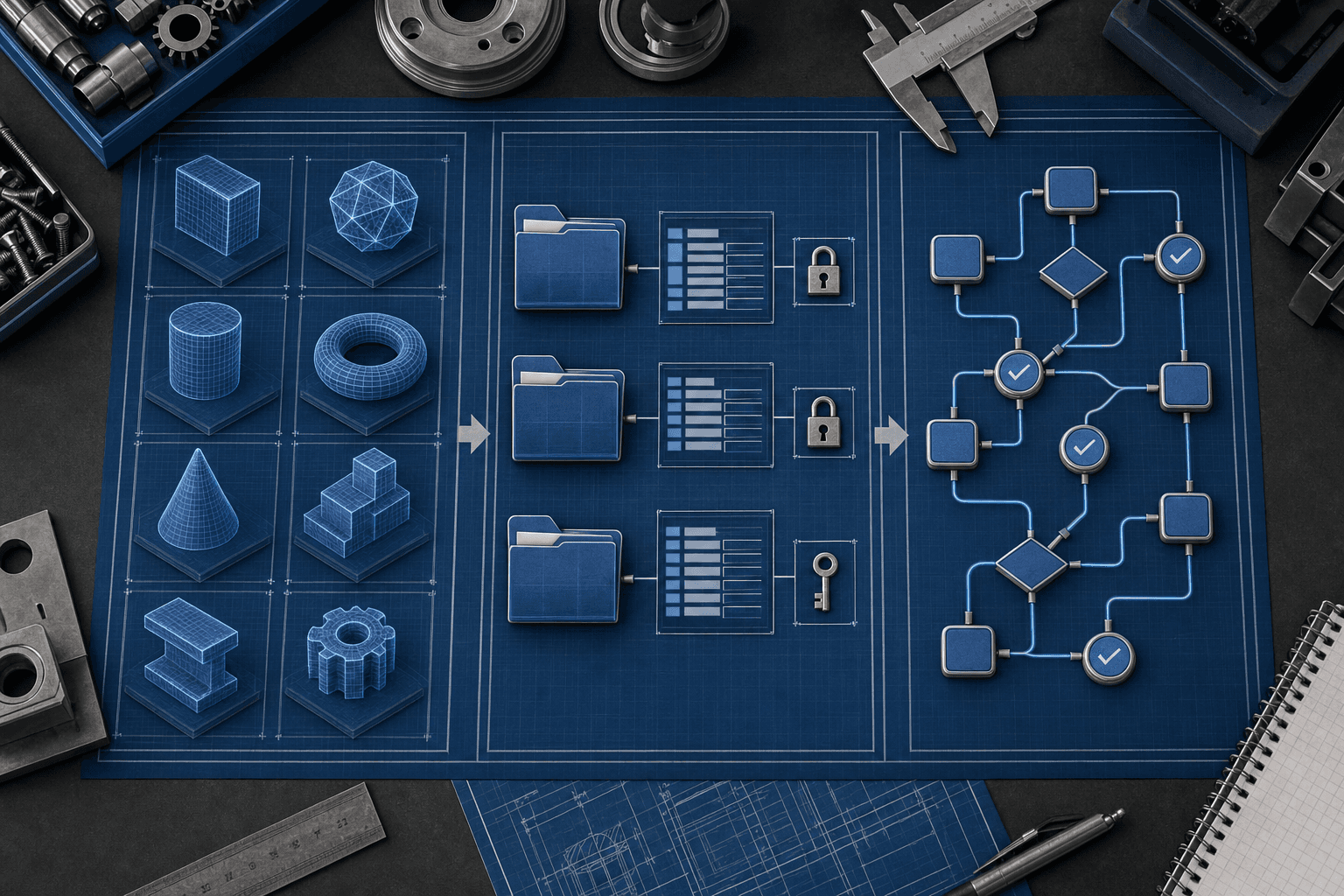
Start with a clear, phased rollout strategy that keeps IP protected at every step.
Most teams get into trouble by skipping ahead. They see a capable AI tool, give it access to real codebases or design files, and then realize weeks later there was no audit trail, no access boundary, and no way to trace what the model saw. A phased rollout avoids that.
Phase 1: Sandboxed Experimentation
Run AI tools against sample low-risk subsets of real work. The goal here is learning what the tools can actually do before you commit large-scale assets to them.
Phase 2: Controlled Expansion
Once the team understands a tool's behavior, expand access incrementally. Add logging, set clear data boundaries by project or sensitivity tier, and document every decision. Each engineer should know exactly what the tool can see, whether working in SolidWorks or any other engineering software environment.
Phase 3: Integrated Workflow With Review Gates
AI runs in the toolchain, but the engineer checks what it flagged, approves what it proposes, and signs off before anything moves forward. Traceable, reversible, auditable at every hand-off.
Access Controls and Audit Logging That Hold Up Under Review
Governance documents without enforcement are decoration. The controls that matter: role-based access scoped to project or sensitivity tier, least-privilege permissions so engineers see only what their role requires, and MFA on every AI workflow entry point.
Audit logging needs to produce reviewable records, not merely exist. When a security review asks who ran a query last Tuesday, what data was involved, and what came out, the log should answer that per user, per workflow, without gaps. That is the standard your IT and security counterparts will hold you to, and it is the right one.
Compliance Frameworks Engineering Teams Need to Understand
Engineering teams working with AI tools generally fall under one or more of the following frameworks, depending on their industry and the data their tools touch.
Key Frameworks at a Glance
Framework | Who It Applies To | Core AI Concern |
|---|---|---|
SOC 2 Type II | Most SaaS-connected engineering orgs | Vendor data handling, access controls |
ISO 27001 | Global or enterprise engineering teams | Information security management |
ITAR / EAR | Defense, aerospace, dual-use hardware | Export-controlled data leaving approved systems |
NIST AI RMF | US federal contractors, broader adoption growing | AI risk governance and auditability |
GDPR / CCPA | Teams handling personal data in designs or logs | Data residency and processing consent |
The one that catches engineering teams off guard most often is ITAR. If your CAD files, simulation outputs, or BOM data touch defense-related specs, feeding that data into a third-party AI tool without checking its data residency and access controls can constitute an unauthorized export under ITAR, regardless of intent.
NIST AI RMF is worth watching even if it is not yet mandatory for your org. It asks whether AI outputs are logged, traceable, and reviewable, which maps directly to what any engineering manager needs before they can put their name on what ships.
How to Know If Your AI Adoption Is Actually Secure
Ask your team three questions: Can you see exactly what data the AI touched? Can you trace every output back to its source? Can you revoke access and roll it back if something goes wrong?
If the answer to any of those is no, the adoption has gaps worth closing. Most of the time, the gap isn't in the AI tool itself; it's in how access was scoped, whether logging was turned on before the first query ran, and whether rollback is a documented procedure or just an assumption.
The controls that hold up under a real security review are the ones built before anyone ran a production query, not retrofitted afterward. That's true whether your team is running DFM checks on unreleased geometry, resolving version mismatches across SolidWorks and your PLM, or routing simulation outputs through an automated workflow.
When an audit or incident review comes, the question is always the same: can you show, step by step, what the model saw, what it returned, and what decision the engineer made at each hand-off? If that record doesn't exist, the answer to all three questions above is effectively no.
A Quick Self-Assessment
Most engineering orgs can gut-check their AI posture in a single conversation. Here's a lightweight framework:
Area | Green | Red |
|---|---|---|
Data access | AI sees only scoped project data | AI has broad repo or file system access |
Output tracing | Every output is logged and reviewable | Outputs appear with no audit trail |
Rollback | Changes are reversible in your own tools | No clear way to undo AI-generated edits |
IP boundaries | Prompts and outputs stay on-prem or in a private tenant | Data routes through a shared third-party model |
A green row across the board means your controls are working. Red rows are where IP exposure actually lives, not in the AI itself, but in the gaps between the AI and your existing access controls.
How Cosmon's AI Agent Handles IP Security for Hardware Engineering Teams
Cosmon's AI Agent runs entirely within your organization's own infrastructure. Your files and records never leave your environment, which means there's no vendor ingestion and no training on your geometry.
Actions the Agent takes are logged and traceable. When it runs a DFM check, resolves a version mismatch between SolidWorks and your PLM, or flags a tolerance conflict after a geometry edit, that step is recorded in your own tools. Learn more about AI agents for mechanical engineering and how access controls are built in. You can open it, check it, and roll it back.
The engineer makes the final call. The Agent proposes; it never signs off on your behalf. Anything flagged as a judgment call gets handed back before it moves forward.
Final Thoughts on AI Security Practices for Engineering Teams
Most engineering teams do not lose IP in one dramatic event. It leaks out through prompts, shared subscriptions, and vendor defaults nobody checked. Classify your data, vet your vendors on the specifics, and build rollout phases that keep real IP out of the model until your controls are ready. That's a posture your team can actually maintain.
That puts your team in a position where AI is part of the toolchain without being a liability, and you can show exactly what it did at every step.
FAQ
What's the fastest way to classify engineering data before rolling out an AI tool to your team?
Map your files into three tiers before any tool touches them: publicly shareable reference models, internal but low-risk configs, and restricted IP like original CAD geometry or validated simulation models tied to core product performance. Once those tiers are defined, access controls follow the data, which keeps your highest-risk files scoped away from tools that haven't been vetted for them.
How do I audit an AI vendor's security posture before signing a contract?
Ask five specific questions in writing: whether the vendor trains on your inputs, where your data is processed and stored, whether a zero-retention option exists, what the breach notification SLA actually says, and whether vendor employees can view your prompts. Get written confirmation on all of them, since verbal assurances don't hold up when a code review flags an unexpected data flow.
Can engineering teams use AI tools without violating ITAR or export control requirements?
Yes, but the tool's data residency and access controls have to be verified first. If your CAD files, simulation outputs, or BOM data touch defense-related specs, routing that data through a third-party AI service without checking where it's processed and who can view it can constitute an unauthorized export, regardless of intent.
What's the difference between a phased AI rollout and just giving your team access to a capable tool?
A phased rollout starts with anonymized data and expands access incrementally with logging and clear data boundaries at each step, so there's always an audit trail of what the model saw. Giving a team broad access upfront means the gaps may only surface during a security review, at which point there's no clean record of what IP was exposed or when.
How do you know if your team's AI adoption is actually secure?
Three questions cut through it: Can you see exactly what data the AI touched? Can you trace every output back to its source? Can you revoke access and roll it back if something goes wrong? If any of those answers is no, the gap lives not in the AI itself but in the space between the AI and your existing access controls.