
6 min read
Supercharging Multiphysics Modeling: How Cosmon's AI Agent Elevates Engineering Workflows in COMSOL (July 2026)
Multiphysics Modeling with Cosmon: How Argus Handles COMSOL's Hardest Workflows
Pushkar Saraf

You’ve just run a geometry change. Now the mesh has to be rebuilt, the boundary conditions need to be re-applied to faces that have shifted, and you’re hunting through nested nodes in the physics tree to find the one parameter you actually wanted to change. This is where the afternoon goes: not to the design question, but to keeping the model consistent with what you just edited. Engineers who use COMSOL Multiphysics know this loop well. The physics is solved; the deep knowledge and expertise to manipulate the software is the friction.
At Cosmon, we built Argus to take on that software management layer: the mesh rebuilds, the node hunting, the boundary condition bookkeeping. The goal is to give engineers back the hours currently spent on configuration so they can spend them questioning whether the design itself is sound.
At Cosmon, we asked a simple question: What if we could stop wrestling with our tools and get back to solving the problem? To answer this question, we built Argus, an AI agent built for engineers who build physical products.
TLDR:
Argus sets up deformation nodes, units, and plot configuration in COMSOL without you digging through nested menus
Changing boundary conditions in a thermal study takes a single text edit; no clicking back through the model tree
Argus ran a parametric sweep on a chip cooler and flagged that going from 400 to 625 fins only dropped temps by 0.12°C
You can iterate geometry from an image; Argus edits the part, remeshes, and runs the study without a separate CAD tool
Cosmon’s Argus agent generates a tailored .docx or .pdf report from a single instruction when a study finishes
Putting Argus to the Test
Of course, “AI” is the buzzword of the decade, and engineers are professionally and reasonably skeptical. We didn’t want to build a chatbot that writes poetry about physics; we wanted a system that actually understands physics and can run tools like COMSOL alongside us.
To put Argus through its paces, we ran it on the kinds of problems that show up in every simulation workflow: structural stress, 2D heat transfer, parametric sweeps, geometry iteration, and report generation. These are the tasks where COMSOL’s GUI creates the most friction. Here are five observations from those runs:
Closing the “Translation Gap” with Transparency
Engineers are trained to think in terms of constraints, loads, and physics equations. But simulation software forces you to think in terms of nodes, mesh elements, and solver configurations. There is a “translation gap” between the engineer’s intent and the software’s execution, and that is where productivity goes to die. Bridging that gap by hand is tedious, error-prone, and utterly forgettable work.
To visualize something as simple as stress, you often have to dig through nested menus, remember specific variable names, and toggle obscure settings just to get the plot to look right. It’s a process of hunting for the right configuration instead of doing high-value engineering.
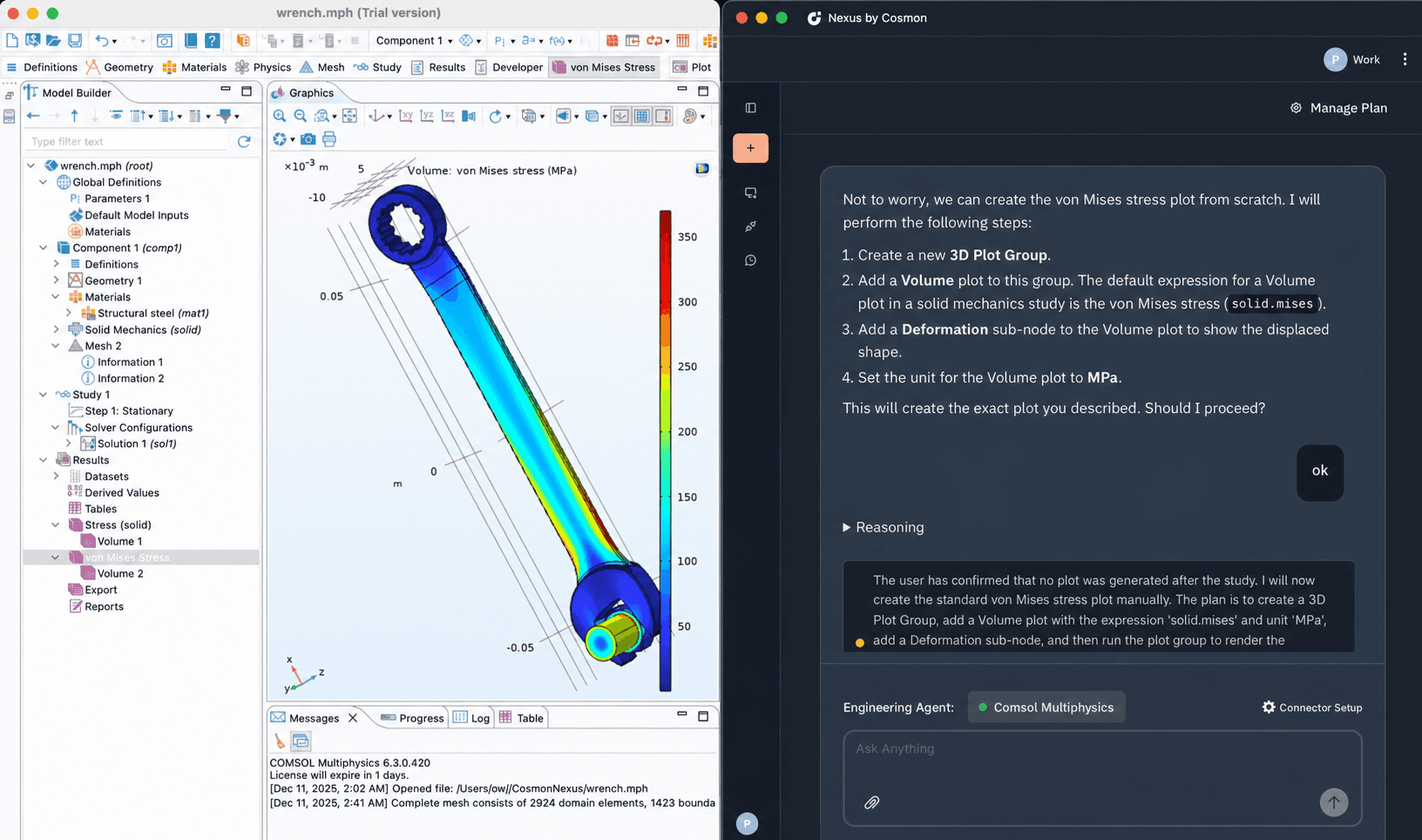
In testing the wrench model, Argus bypassed this manual configuration entirely. Instead of having to figure out which sub-nodes to add, the agent automatically assembled a plan identifying the correct configuration adding the necessary deformation nodes, and setting the units before executing plots perfectly. It showed its work at each step, so the engineer could audit the reasoning instead of trusting a black box.
Faster Iteration in Practice
Engineering isn’t about running a simulation once; it’s about iterating. “What happens if the wall is 200°C instead of 100°C?” In a traditional GUI, every iteration forces you to click back through the model tree, find the specific physics node, and manually update parameters. It’s a slow process that breaks your train of thought. Momentum matters in design work, and every context switch quietly taxes it.
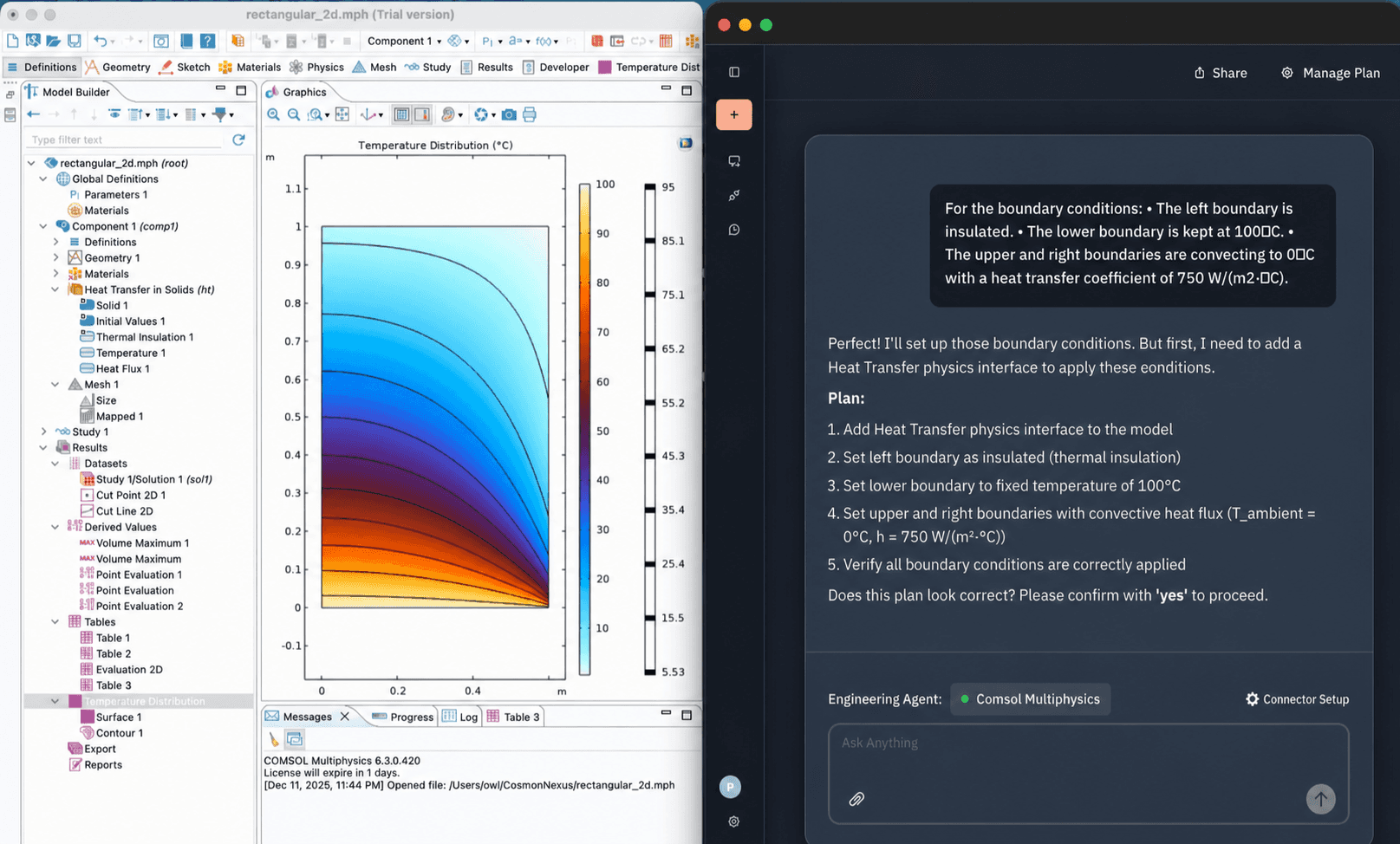
Natural language turns iteration into a conversation. In our 2D heat transfer test, using a single prompt, we defined the complex mixed boundary conditions: “insulation on the left, fixed temperature on the bottom.” Because the setup is text-based, testing a new thermal scenario doesn’t require digging through menus; you simply modify the sentence, and the agent reconfigures the physics instantly. The result is that the cost of asking “what if?” drops to nearly zero, and engineers can test more of the design space instead of settling for the first configuration that converges.
Creativity at the Speed of Thought with Generative Design
In traditional workflows, design exploration is tedious. If you want to optimize a heatsink for example, you usually have to manually set up parametric sweeps, define parameter ranges for “fin density” and “fin height,” and then spend hours post-processing the data to find the optimal trade-off.
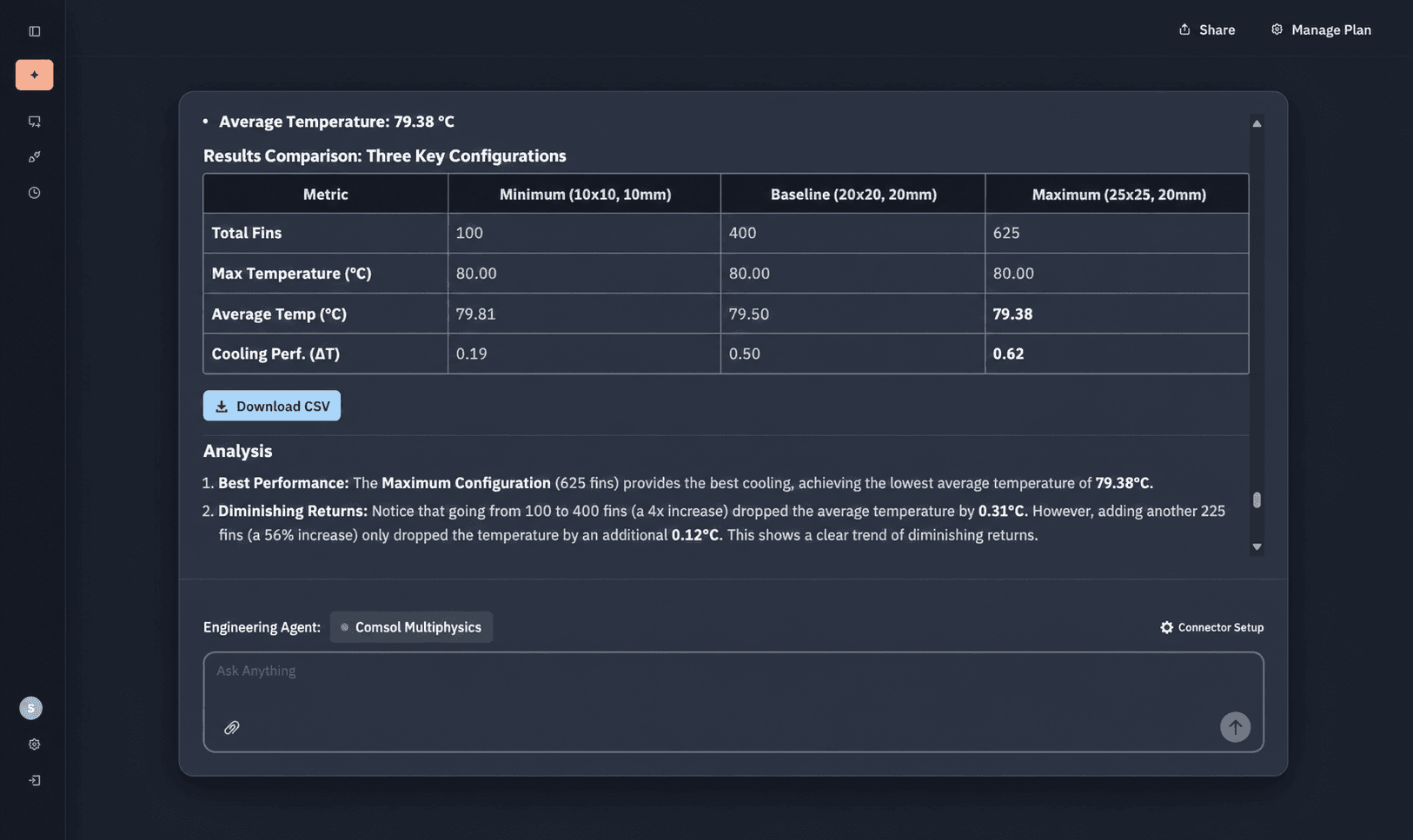
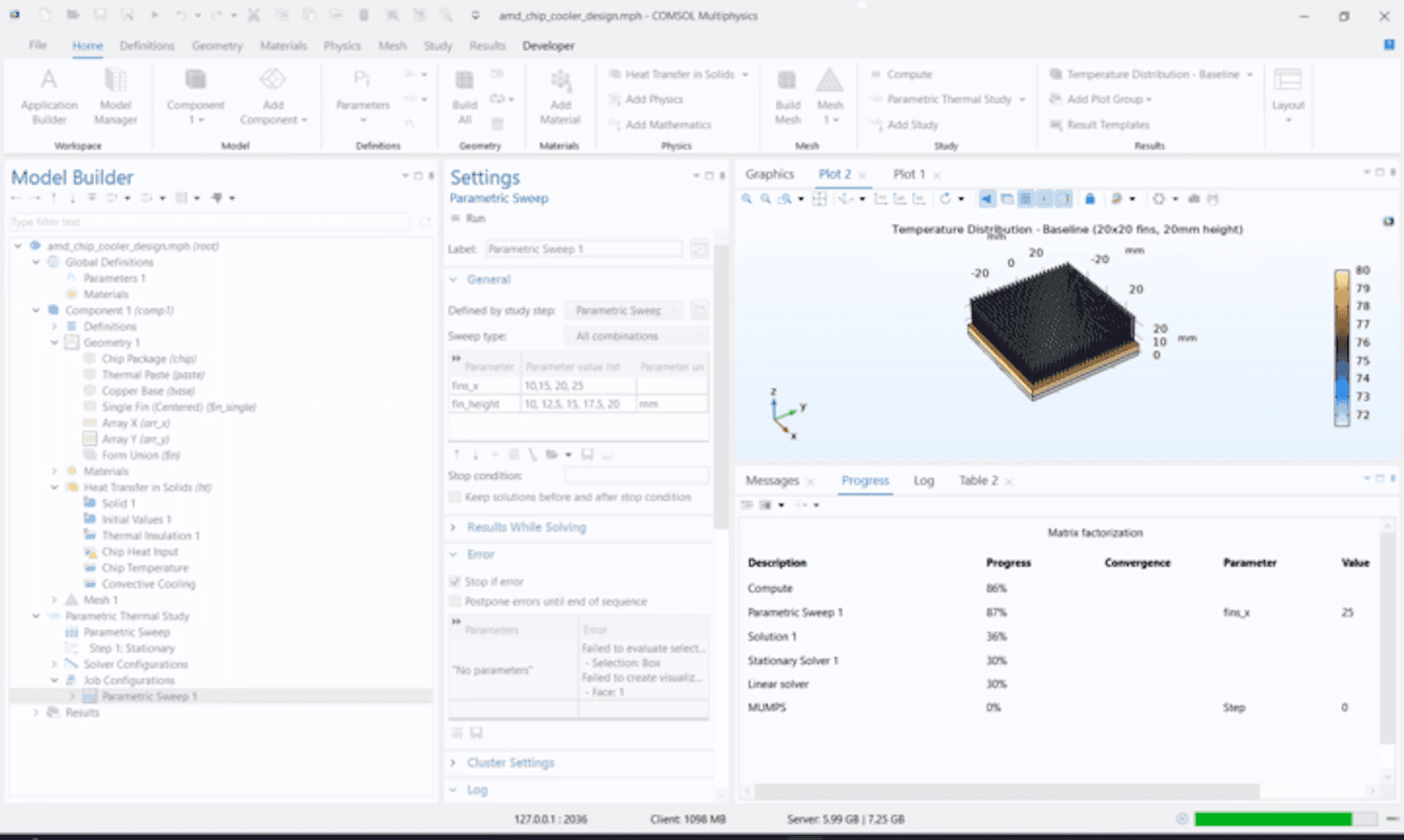
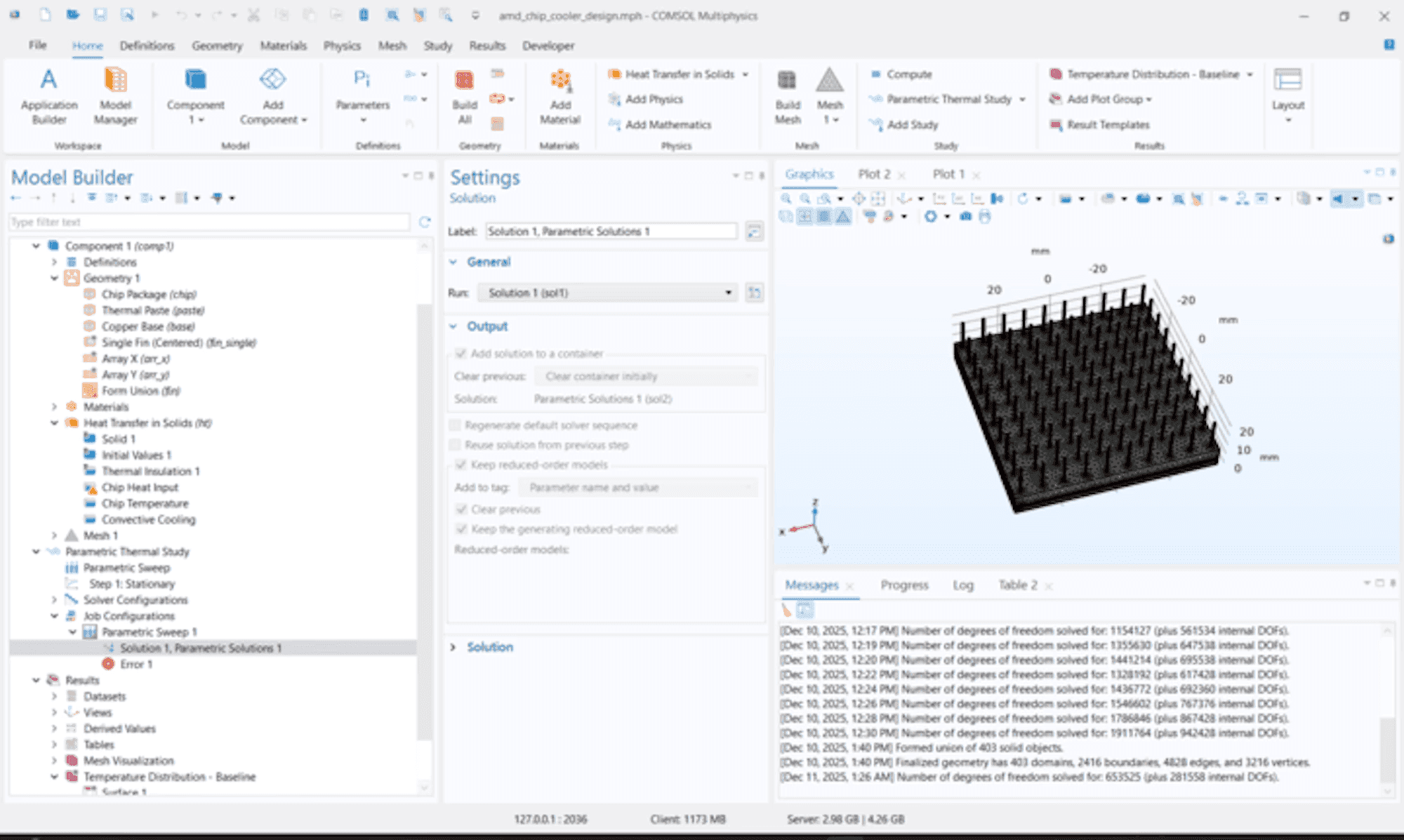
We challenged Argus to handle this entire “Design of Experiments” loop for an AMD chip cooler. The agent set up and ran the parametric study, then surfaced a comparative table so the engineer could read the trade-offs directly.
The Sweep: The agent autonomously set up a parametric study to test three distinct configurations: Minimum (100 fins), Baseline (400 fins), and Maximum (625 fins).
The Insight: Instead of just handing back raw data, Argus generated a comparative table and identified the point of diminishing returns. It showed that increasing the fin count from 400 to 625 (a 56% increase in material/complexity) only yielded a 0.12°C temperature drop.
This allows engineers to ask high-level questions like “Is it worth adding more fins?” and get a data-backed answer immediately, shifting the focus from building the model to understanding the design trade-offs. That single insight - more material for negligible gain - is exactly the kind of judgment call that separates a good design from an over-engineered one. Catching it early, before tooling and cost are locked in, is where real savings live.
Metric | Minimum (10x10, 10mm) | Baseline (20x20, 20mm) | Maximum (25x25, 20mm) |
|---|---|---|---|
Total Fins | 100 | 400 | 625 |
Max Temperature (°C) | 80.00 | 80.00 | 80.00 |
Average Temp (°C) | 79.81 | 79.50 | 79.38 |
Cooling Perf. (ΔT) | 0.19 | 0.50 | 0.62 |
Shrinking the CAD-CAE bottleneck
There is an uncomfortable truth in simulation: most CAE analysts are not CAD designers. They are masters of physics, but having to stop an analysis to open CAD software, redraw a part, export it, and re-import it into COMSOL is a massive productivity killer. The handoff introduces delays, version mismatches, and a dependency on someone else’s schedule.
From Prompt to Geometry

We challenged Argus to bridge this skills gap using a standard “Thermal Actuator” model. We started with a vague prompt: “Build a simple geometry resembling a two hot arm thermal actuator.” The agent acted as a designer, autonomously generating the initial geometry and helping run the baseline study.
Iterating from an Image
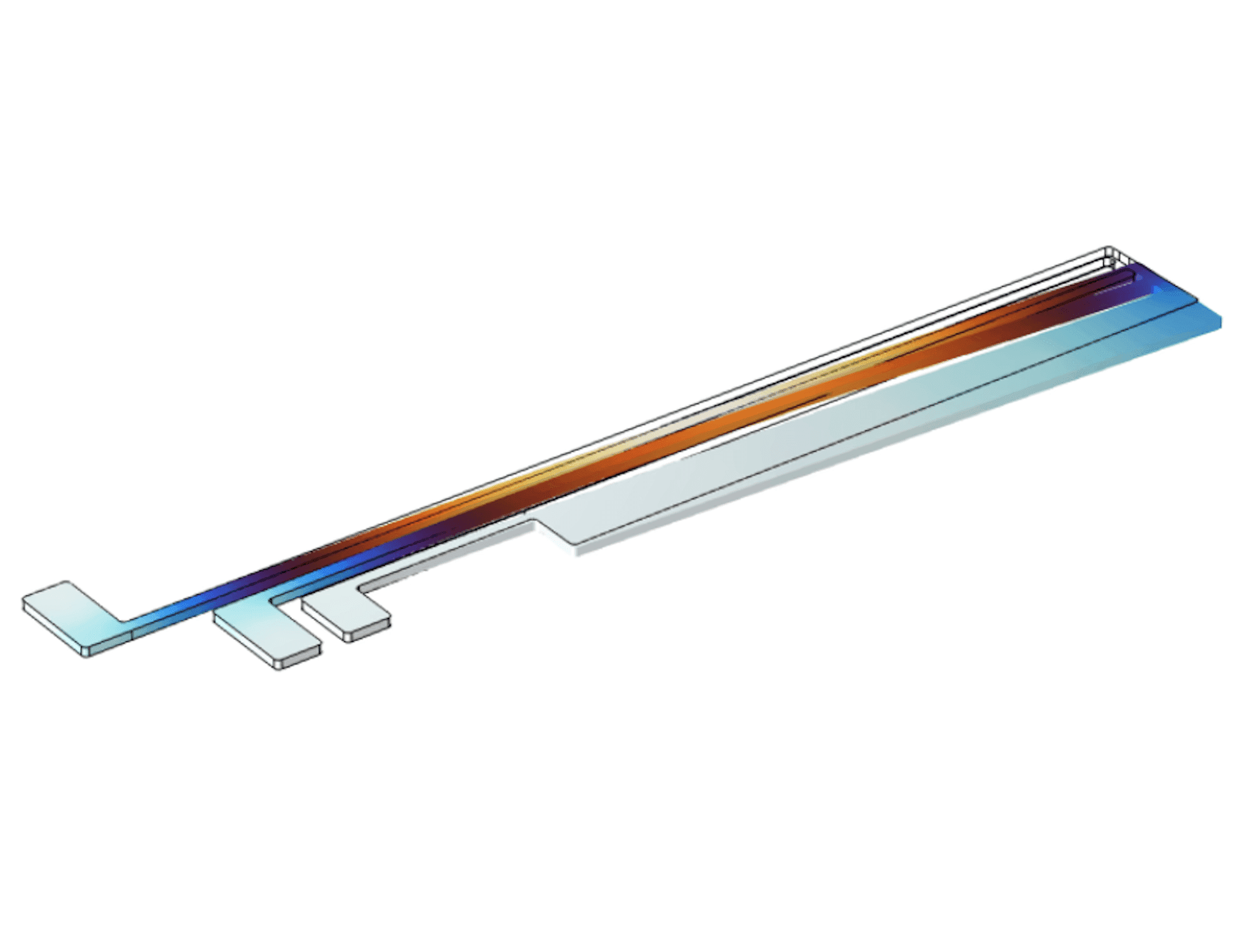
But the real power was in the iteration. When simply provided with an image describing a geometric update. The agent interpreted the visual intent, worked with the user to handle the CAD modification directly within the software, remeshed the domain, and ran a new study. The result was fully converged physics on a modified part achieved without the engineer ever touching a dedicated CAD tool. For a specialist who has always had to borrow a colleague’s CAD time, that closes a gap that used to cost days.

Automating the “Last Mile” of Simulation Reporting
One of the hidden time sinks in simulation isn’t solving the physics, it’s assembling a clean, shareable report afterward tailored to your stakeholders’ specifications. Traditionally, engineers export cookie-cutter documents from within the software or are forced to look at results, export data, format headings, summarize results, and chase down missing metadata.
Argus eliminated that entire workflow.
From a single instruction, it generated a detailed, tailored technical report including the geometry, simulation overview and acoustic study results, packaged cleanly into a .docx or .pdf. The output included labeled geometry screenshots, a mesh statistics summary, the full physics settings used in the study, annotated result plots, and a key findings section written in plain language - the kind of structured document a reviewer or project lead can read without opening COMSOL. Instead of piecing together documentation after the fact, engineers get a ready-to-share report the moment a study finishes.
This moves reporting from a manual chore into an automatic deliverable, freeing engineers to focus on the next question, not the paperwork. A report that once consumed an afternoon now arrives in seconds, consistent every time.
Time to Think Again
Engineering is about more than solving problems. It’s about imagining solutions. With intelligent agents handling the repetitive, detail-heavy work, engineers can finally engage with the questions that matter: “what if?” and “why not?” By amplifying human judgment instead of replacing it, Argus can reshape simulation from a chore into an arena for creativity and discovery. The goal was never to take the engineer out of the loop. It was to give them back hours, and with them, the freedom to think again. That freedom, more than any single feature, is exactly what we set out to build.
SEE RELATED ARTICLES